

Activity › Forums › Maxon Cinema 4D › How can I change the “Title safe color or opacity?”
-
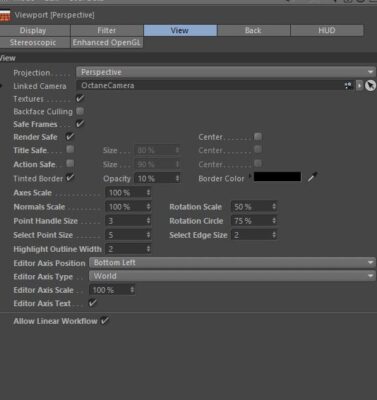
How can I change the “Title safe color or opacity?”
Posted by Dave Tavernier on June 7, 2021 at 2:03 pmHow can I change the “Title safe color or opacity?”
C4D R21
Jim Scott replied 5 years, 3 months ago 3 Members · 4 Replies -
4 Replies
-

Jim Scott
June 7, 2021 at 7:05 pmAll of the scheme colors can be found in Preferences (Edit > Preferences, or Command + E) > Scheme Colors (click the + to open). Many, but not all, colors are customizable. The ones that are will bring up a color selector at the bottom of the window when selected. The Title Safe color for the Picture Viewer can be edited, but I could not find one for the View window. You’re probably running the Dark scheme (see Interface at the top of the Preferences window) so one option would be to lighten one or both of the Background – Gradient 1, 2 colors (under Editor Colors) to make the Title Safe standout better.


Reply to this Discussion! Login or Sign Up