Creative Communities of the World Forums

The peer to peer support community for media production professionals.

Activity Forums Maxon Cinema 4D how add more polygons to the previously selection ?

  • how add more polygons to the previously selection ?

    Posted by Mauricio Barrientos on November 13, 2023 at 7:52 pm

    i am using CINEMA 4D 2023,

    and i need to add more polygons to the previously selection already made.

    and on old cinemas R22 just select poligons and then press SET SELECTION, but here on cinema 2023, i dont know how to do it.

    please help, i will apreciate so much any comment…. and here a video explain my problem.

    sorry my english thanks and bless.

    .

    https://youtu.be/2xYqQY_aRR4

    Some contents or functionalities here are not available due to your cookie preferences!

    This happens because the functionality/content marked as “Google Youtube” uses cookies that you choosed to keep disabled. In order to view this content or use this functionality, please enable cookies: click here to open your cookie preferences.

    Kouraib Abdmalek
    replied 2 years, 6 months ago
    3 Members · 2 Replies
  • 2 Replies
  • George Charoupas

    November 13, 2023 at 9:18 pm

    Hello Mauricio,

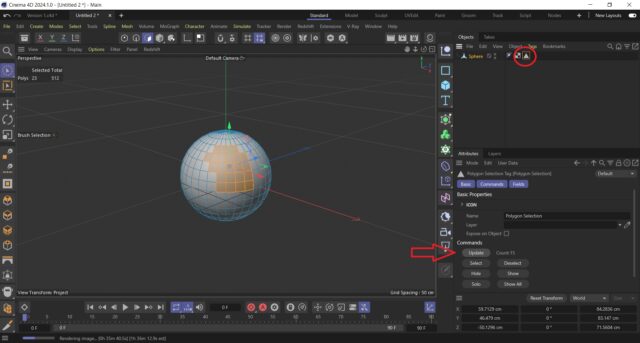
    You will need to select the polygons you need and then select the polygon selection tag on the model and press the update button.

  • Kouraib Abdmalek

    November 14, 2023 at 9:55 am

    It seems that the “Set selection tool” has been renamed to “Store Selection”, although I did not find that in the Tools renamed in Cinema 4D R25 on the Maxon website, as in this link.

    https://support.maxon.net/hc/en-us/articles/4406617644946-Tools-renamed-in-Cinema-4D-R25-In-case-you-can-t-find-them-under-their-new-name-

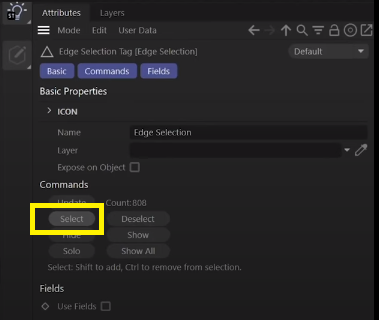
    So even without using any material, you can select polygons and then go to Store selection to save your selection, and then whenever you need to increase or decrease the polygons all you have to do is click on the triangle in the right panel, then go to Select so you will get your saved selection. Then, as George mentioned, you could modify the selection and then click Update.

We use anonymous cookies to give you the best experience we can.
Our Privacy policy | GDPR Policy