

-
Help with workflow – auto-match loudness
Hello all – my first post here.
I am using Premiere Pro for my youtube channel, it’s just a hobby and I am not a professional.
I’d like to pick your minds to see if I can improve my workflow.
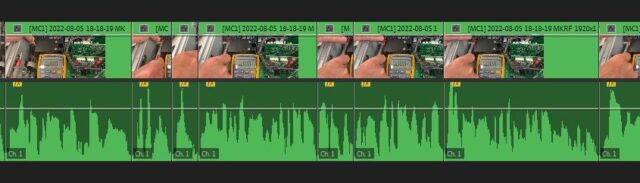
After I complete the edit of my video I spend some time tweaking the sound. One of the tasks I perform is to level the various clips usind Adobe Auto-Match (I’m wearing a lavalier microphone and sometimes clips end up at different levels. I am also using my iPhone to record, so not really a professional production, but decent!)
Now, the auto-match works ok-ish and levels the volume of the clips nicely. However, when I edit content I often end up with lots of edits, sometimes very small clips. If those clips don’t have a dialogue in it, Adobe will boost the floor noise to the max as it’s trying to level that clip to the reference level.
I now have to make sure that those sections have their volume reset. It’s a time consuming task and I usually miss some.
Is there a way I could change my workflow to avoid that? Or maybe a better way to level my sound.
Any ideas are welcome!
Thank you!

Sorry, there were no replies found.