Creative Communities of the World Forums

The peer to peer support community for media production professionals.

Activity Forums Adobe Premiere Pro Help appreciated. Green lines, orange streaks and desaturation on apple prores.

  • Help appreciated. Green lines, orange streaks and desaturation on apple prores.

    Posted by Samuel Kitchen on April 6, 2022 at 1:01 pm

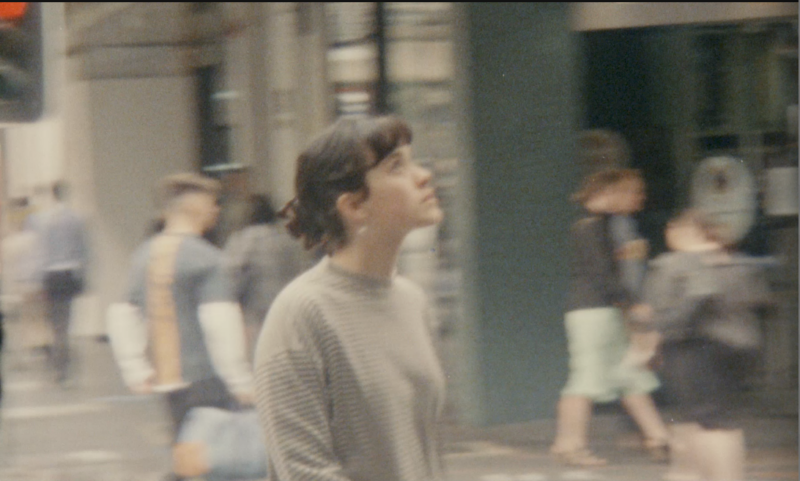
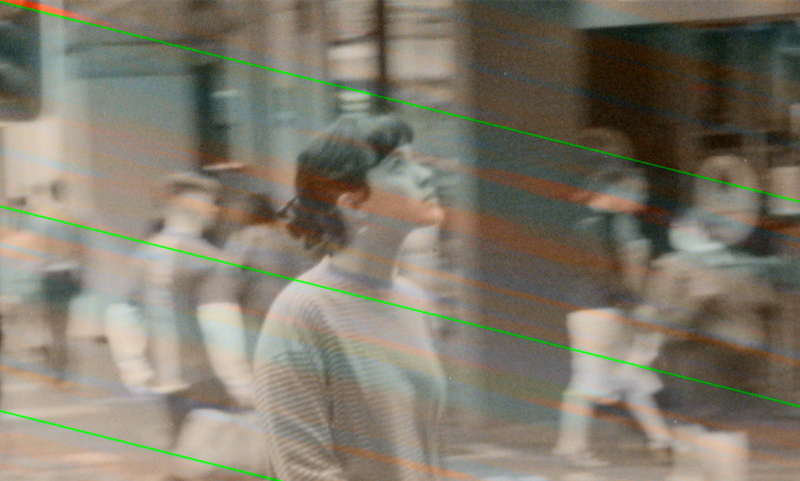
    Flashing orange streaks and diagonal green lines with major desaturation no matter how I export this project in prores.

    As you can see from the second image H.264 exports don’t have this issue only apple prores.

    Settings are match source, max depth, max render, not that that changes anything. I’ve experimented to no avail.

    Working on older version of prem (2017) on my 2013 macbook pro. Source is 4k film (8mm) telecine, 15 frames a second.

    No plugins used, so no it’s not a watermark.

    As per other forum posts I tried changing the video settings to Mercury Playback Engine Software Only but that didn’t work.

    Any help appreciated

    Mads Nybo jørgensen
    replied 4 years, 5 months ago
    2 Members · 1 Reply
  • 1 Reply
  • Mads Nybo jørgensen

    April 6, 2022 at 2:48 pm

    Hey Samuel,

    I suspect that your PPro 2017 version might not have been programmed to support ProRes.

    A suggestion would be to upgrade to 2019 or later versions, as this is when Adobe integrated ProRes across both Mac and PC.

    Out of interest: What happens when you put the h264 “clean” rendered version through Adobe Media Encoder (or PPro) to ProRes?

We use anonymous cookies to give you the best experience we can.
Our Privacy policy | GDPR Policy