Creative Communities of the World Forums

The peer to peer support community for media production professionals.

Activity Forums Adobe After Effects Expressions Have Expression Identify which it is on, just like Expression Pick Whip Function

  • Have Expression Identify which it is on, just like Expression Pick Whip Function

    Posted by Gideon Nielson on April 15, 2022 at 10:21 pm

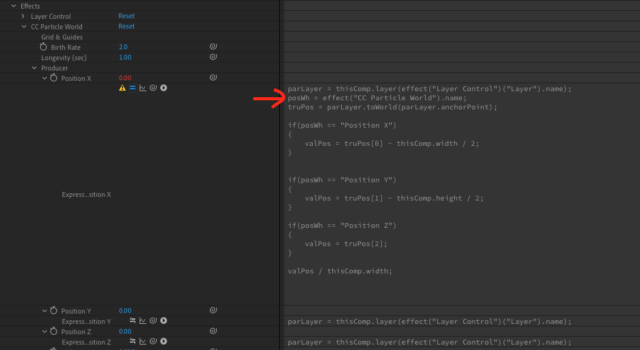
    I have a struggle to find the property/attribute name. I know it could be type such as “thisComp.layer(“White Solid 6”).effect(“CC Particle World”)(“Position X”).name”. It will work, but in this case, it would be tedious for me, especially when I work with many particle effects, because I would have to re-type for each particle position (X, Y and Z). I want the expression to simply identify which property/attribute it is on, just like how the expression whip works. Then I would use its reference in “if” conditions. Here is the picture. You’ll see the red arrow. It is the one I am struggling to find the property/attribute name. I have tried different ways such as “propertyGroup(1).name” and others, but they doesn’t make the outcome I want. Thanks!

    Gideon Nielson replied 4 years, 5 months ago 2 Members · 8 Replies
  • 8 Replies
  • Dan Ebberts

    April 15, 2022 at 10:39 pm

    Did you try thisProperty.name ?

  • Gideon Nielson

    April 18, 2022 at 9:39 pm

    This works perfectly! It worked on Position Y and Z without lifting a finger or having to re-type!

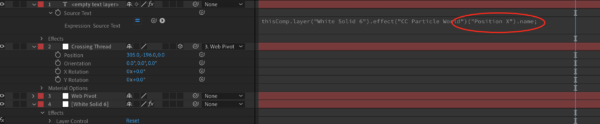
    One more question… is there any alternations to thisProperty.name? I usually use the text for a debugging purpose. Here is the example in the image with the red circle on the attachment. How do you replace it?

  • Dan Ebberts

    April 18, 2022 at 10:10 pm

    I’m confused. If you want to reference the property name with an expression on another layer/property, why wouldn’t you just use the pickwhip, add .name, and end up with what you have in your example? Sorry, I’m missing something…

  • Gideon Nielson

    April 18, 2022 at 10:52 pm

    Sorry for not clarifying.

    It’s hard to explain, but I’m doing my best. The pickwhip is useful but not always because it is too specific. In this case with the text, I just want it to tell me another layer’s property name. It’s just for the debugging purpose.

    So, I also have tried – thisComp.layer(“White Solid 6”).effect(“CC Particle World”).thisProperty.name, but this doesn’t work. So, is there any alternations for thisProperty.name? Thanks!

  • Dan Ebberts

    April 18, 2022 at 11:34 pm

    Sorry, I don’t get it. You could do something like:

    thisComp.layer("Medium Red Solid 3").effect("CC Particle World")(17).name

    and get the same result, but I suspect that’s not what you’re after…

  • Gideon Nielson

    April 19, 2022 at 10:09 pm

    No, it’s not what I looked, but I have thought about that for a day and realized that trying to apply something general doesn’t work for this case because the effect in another layer has many properties and it has to be specific, just like the pickwhip method or the previous one you just showed me. It’s unlike the first case where the layer or effect can apply thisProperty.name to itself (just like I mentioned about “Position X”, “Position Y”, etc. under the CC Particle World effect), and that expression already know which property it is on. Am I correct?

  • Dan Ebberts

    April 19, 2022 at 10:47 pm

    I think so. The pick whip knows what property you’re pointing at, and thisProperty knows which property you’re referring to, but an expression referring to another property needs to be told which property. I think that’s what you’re saying.

  • Gideon Nielson

    April 19, 2022 at 11:21 pm

    Yeah, it’s what I tried to say, and I got it. Thank you!

We use anonymous cookies to give you the best experience we can.
Our Privacy policy | GDPR Policy