

-

Wayne Waag
March 13, 2021 at 2:45 amNew build 1.0.3.16 is now available.
Change log may be found here. https://tools4vegas.com/wp-content/uploads/HappyOtter-Change-Log.pdf
New Features and Improvements
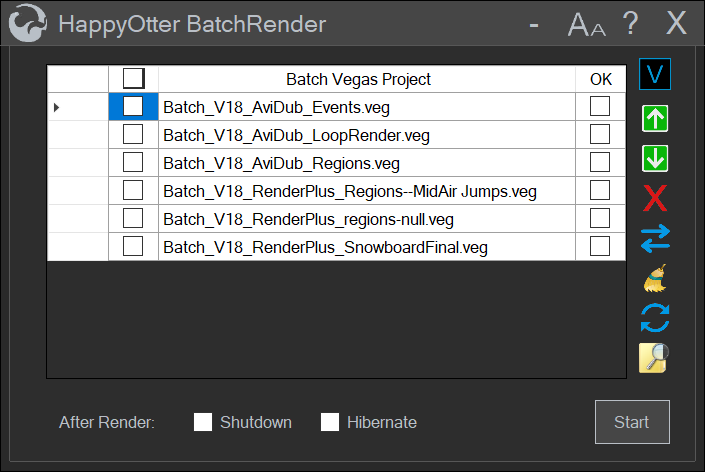
- Batch Rendering
- Batch rendering jobs may now be created for later execution (e.g. o)
- Supported tools include RenderPlus and AviDub
- Project Templates
- Templates may be created which include all filtering, rendering and
- Supported tools include RenderPlus and AviDub
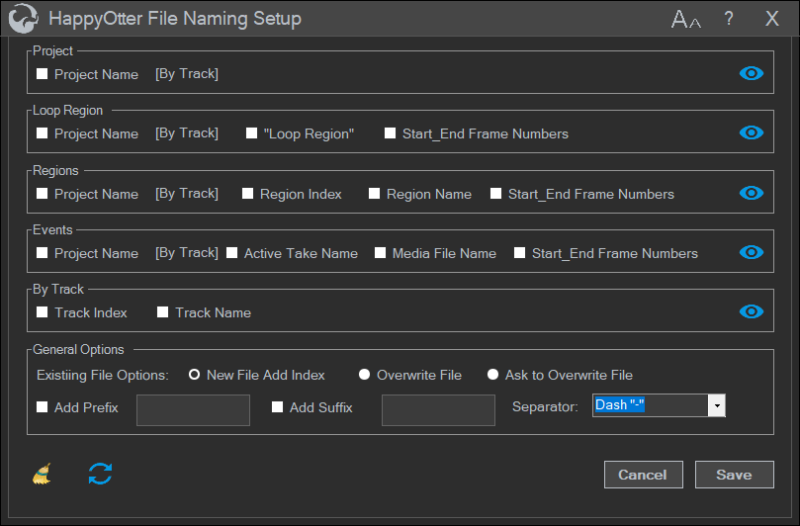
- File Naming Setup
- Custom settings for the names of rendered files
- Supports Project, Loop Region, Regions, Events, and ByTrack renderi
- Options for overwriting or renaming when rendered file with same na
- Supported tools include AudioTrim, AviDub, RenderEvents and RenderPlus
<div>
A demo of new features can be found at https://www.vegascreativesoftware.info/us/forum/happy-otter-scripts-for-vegas-pro–113922/?page=33#ca794618
</div>

-
Wayne Waag
May 13, 2021 at 4:40 pmNew build 1.0.3.17 is now available.
Change log may be found here. https://tools4vegas.com/wp-content/uploads/HappyOtter-Change-Log.pdf
New Features and Improvements
- OtterMenu-now checks for new HOS builds when a script is launched
- KwikPreview
- Added 8 and 10bit MagicYUV direct renders from Vegas for those with MagicYUV license
- Added support for interlaced encoding to built-in Mpeg2 template
- Added temp folder quick access button similar to other tools
- RenderPlus – Added support for interlaced encoding when using the Mpeg2 format
- AviDubAdded – Avisynth color format conversion options including YUV422 and YUV444
- MediaRenamer – Vegas interface now accessible after tool is launched permitting changes in What to Rename
Bug Fixes
- Uninstaller failed to remove BatchRender shortcut from desktop—fixed
- ProxyAssist-no Vegas template error message on exit when using x264—fixed
- Render Plus—join option not working for output filepaths containing whitespace—fixed
- AviDub – use of media file properties for temporary render not working correctly–fixed
-
Wayne Waag
July 8, 2021 at 2:37 amNew build 1.0.3.18 is now available.
Change log may be found here. https://tools4vegas.com/wp-content/uploads/HappyOtter-Change-Log.pdf
For a somewhat better formatted version. https://www.vegascreativesoftware.info/us/forum/happy-otter-scripts-for-vegas-pro–113922/?page=35#ca810586
New HappyOtter Tool
AudioSyncR
- Waveform matching of audio events and loop regions with reference audio track
- Optional pre-syncing using timestamp metadata
- Options for adding synced audio to event as a take or to new track
- Drift detection and correction by adjusting Vegas playback rate
- Synced events moved to align with reference track or remain in same position with added audio
- Trial version for licensed HOS users expires 8/15/2021
- AudioSyncR Demos
Event Syncing https://tools4vegas.com/wp-content/uploads/EventsSyncing.mp4 - Long Program Syncing https://tools4vegas.com/wp-content/uploads/LongProgramSyncing.mp4
- Timestamp Presyncing https://tools4vegas.com/wp-content/uploads/TimeStampPresyncing.mp4
- Drift Correction https://tools4vegas.com/wp-content/uploads/DriftCorrection.mp4
- Dialog Options https://tools4vegas.com/wp-content/uploads/DialogOptions.mp4
- Licensing Information https://tools4vegas.com/get-a-license/
New HappyOtter Script
EventDucker
- Event based ducking of audio Volume envelope and video Composite envelope
- Selected or all track events can be used to control ducking
- Silence detection and creation of new audio track with silent sections removed
- Option to replace or add to existing envelopes in multiple target trackss
- Event Ducker Demo https://tools4vegas.com/wp-content/uploads/EventDuckerDemo.mp4
New Features and Improvements
- RenderPlus
- Added dts audio encoding
Added button to replace render file name with project nameImportAssist
- Added dts audio import which transcodes to a lossless pcm wave file
Added Cineform and ProRes encoding options using FFmpeg
- ProxyAssist
- Added support for events with multiple Takes
OtterBar,
- OtterInfoBarAdded opacity control for toolbar icons
Bug Fixes
- License activation failed if first or last name contained spaces (E.g. Joe Bob)—fixed
- AudioTrim
- Audio stream selection not being honored for events renders—fixed
- Keeping/removing certain audio event and track Fx not working correctly–fixed
-

Graham Bernard
July 28, 2021 at 7:13 amWould leave Home without HOS now! ESP. KwikPreview and The Render as a Take Script.
Wayne, take a Bow ?♀️!
-
Graham Bernard
July 28, 2021 at 7:14 amTake a Bow, Wayne! VegasPro? It’s what KwikPreview and Render as Take was meant for.
-
Wayne Waag
September 21, 2021 at 5:04 pmNew build 1.0.3.19 is now available.
Change log may be found here. https://tools4vegas.com/wp-content/uploads/HappyOtter-Change-Log.pdf
For a somewhat better formatted version.https://www.vegascreativesoftware.info/us/forum/happy-otter-scripts-for-vegas-pro–113922/?page=36#ca821621
New versions of Nvencc64, Qsvencc64, Vceenc64
New Features and Improvements10 Bit Frameserving Support (requires use of CuminCoder)
- Outputs 10bit v210 codec
- Pause/resume rendering
RenderPlus
- Added ProRes encoding including interlaced renders
- Added option to use custom Avisynth scripts “as is” in Avisynth Filters dialog
- 10 bit Frameserving and pause/resume support
Import Assist
- New Trimmer dialog for accurately trimming media files prior to import
- New Crop/Resize dialog
- Added support for Avisynth pre-filtering with dialog similar to Render+ including
- Crop/resize/trim
- Deinterlacing
- Frame rate changes/slow motion
- Fisheye removal
- Denoising/sharpening
- V19 Dark theme preset
Bug Fixes
- KwikProxy—exception after creation of first proxy—fixed
-
Wayne Waag
November 22, 2021 at 6:53 pmNew build 1.0.3.20 is now available.
Change log may be found here. https://tools4vegas.com/wp-content/uploads/HappyOtter-Change-Log.pdf
New versions of FFmpeg, Nvencc64, Qsvencc64, MPC-HC
New Features and Improvements- CuminCoder support now added to all rendering tools
- KwikProxy
- Improved Vegas style proxy creation using avc and mpeg encoding for Vegas 18-19
- Option to convert vegas-style proxies to swap style proxies without re-encoding
Option to add video levels change (PC to TV or TV to PC )during processing
Bug Fixes
- Media Finder – crash when search folder doesn’t exist—fixed
- Import Assist – failed when importing AC3 files using open file dialog—fixed
- Error during setup for missing keyboard.ini file—fixed
Known limitations – Sony Vegas 12
- No longer compatible with V12 Windows 7 installations
- ImportAssist in Win10 requires use of previous version script (ImportAssist.V12)
-

Wilfried Van
November 29, 2021 at 5:44 pmWould be great to be able to buy it through our bank account instead of paypal .Don’t have a paypal and don’t want one .
-
Wayne Waag
August 6, 2022 at 4:12 pmNew Build 1.0.3.22 is now available that includes CuminCode FrameServer support. For more information, https://www.vegascreativesoftware.info/us/forum/happy-otter-scripts-for-vegas-pro–113922/?page=37#ca853335
-

Steve Rhoden
August 29, 2022 at 1:08 pmBrilliant to have included the CuminCode FrameServer Wayne !
Reply to this Discussion! Login or Sign Up