

-

Wayne Waag
October 2, 2020 at 8:07 pmYou must get a trial license. Launch Help and click on Trial License.
-

Chris Hewitt
October 2, 2020 at 9:01 pmOh ok, but I only downloaded the file from your site a few days ago but installed it over an older trial version.
-
Wayne Waag
October 2, 2020 at 9:45 pmIt all depends on when you obtained a trial license. If it was after the initial release back in May, your trial license has obviously expired. Like Vegas at the moment, once your trial has expired, you’re not eligible for another. However, send me a PM and I’ll see if we can work something out. A suggestion–create an account on the Magix Vegas Pro forum at https://www.vegascreativesoftware.info/us/vegas-pro-forum/ and send me a PM there since it can’t be done here in CC, plus this new forum layout makes it almost impossible to easily respond to new posts.
-
Wayne Waag
October 3, 2020 at 1:55 amNew build 1.0.3.9 is now available.
Change log may be found here. https://tools4vegas.com/wp-content/uploads/HappyOtter-Change-Log.pdf
New Tool
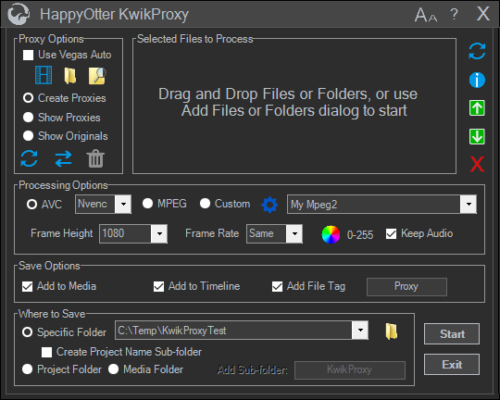
- KwikProxy—tool which increases the speed of proxy creation when compared to native Vegas For additional information and a demo, see https://www.vegascreativesoftware.info/us/forum/quicker-proxy-creation–124298/
<div>
New Features
- All tools—displays long folder names if larger than dropdown list width
- Added Nvenc lossless as a mode to all rendering tools
Bug Fixes
- SpeedRamp—selected event also required track to be selected—track selection no longer required
- LoadToOpacity—crash if launched in project containing no audio tracks—fixed
- AudioTrim—wrong tooltip shown when hovering over Where To Save—fixed
- KwikPreview—crash if MediaPlayerClassic not closed from the last preview–fixed
</div>

-
Wayne Waag
October 9, 2020 at 5:22 pmNew build 1.0.3.10 is now available.
Change log may be found here. https://tools4vegas.com/wp-content/uploads/HappyOtter-Change-Log.pdf
Bug Fixes
- Better exception handling if FrameServer fails to start—all rendering tools
- RenderPlus—2 pass option for X264 and X265 not working—fixed
- Crash if tool launched from OtterMenu or Vegas script menu after new install–fixed
-
Wayne Waag
November 10, 2020 at 5:55 pmNew build 1.0.3.11 is now available.
Change log may be found here. https://tools4vegas.com/wp-content/uploads/HappyOtter-Change-Log.pdf
New Tool
OtterControl—external app enabling power users to launch large number (max 119) of editing actions
-Vegas actions include execution of scripts, extensions, keyboard shortcuts
-External actions include launching external apps and folder navigation
-Highly customizable UI with choice of button size, text, color and icon
<div>-Compatible with multi-button mouse and Contour ShuttlePro V2Detailed information can be found at https://tools4vegas.com/ottercontrol/
New Features
ProxySwitch—automatically changes project resolution for proxies created with KwikProxyOtterBar, OtterInfoBar
</div>-Action repeat button added which runs the last executed action
-Option to add Vegas keyboard shortcuts as toolbar iconsOtterBar–Maximum of 100 icon buttons with selectable number of buttons per row.Bug Fixes
<div>ProxySwitch—not working correctly with ProxyAssist after mod to support KwikProxy—fixed</div><div>
ProxyAssist—crash if no saved project and cancel selected in project save dialog—fixed
KwikProxy
-Range selection (full vs limited) not being honored for MPEG-2 and GPU renders—fixed</div>-Mpeg-2 proxies pixelated—fixed (default bit rate was set too low)
-
Wayne Waag
November 25, 2020 at 8:33 pmJust a reminder.
HappyOtterScripts
Black Friday Sales Event–Save 25%
Full license $59
Now through Nov 30.
https://tools4vegas.com/licensing/ -
Wayne Waag
December 1, 2020 at 6:21 pmNew build 1.0.3.13 is now available.
The activation and licensing code has been rewritten in an attempt to reduce the number of false positives that have recently occurred with some AntiVirus apps. (In testing, no issues with Norton 360). Please report any recurring problems along with the files that have been quarantined.
Change log may be found here. https://tools4vegas.com/wp-content/uploads/HappyOtter-Change-Log.pdf
New Features
- AviDub
- 10bit support using Direct Render option with MagicYUV and ProRes intermediate
- Added IVTC script for converting telecined 29.97 footage to 23.976 progressive
- Movable render progress dialogs
- Offline activation now available
- Color Cop—recompiled to support UHD monitors
Bug Fixes
- Import Assist—crashed when entering new filetag for rewrap–fixed
To download, Launch Help from OtterBar, OtterInfoBar, or OtterMenu and click on “Check Now”.
-
Wayne Waag
January 12, 2021 at 10:28 pmNew build 1.0.3.14 is now available.
Change log may be found here. https://tools4vegas.com/wp-content/uploads/HappyOtter-Change-Log.pdf
New Tool
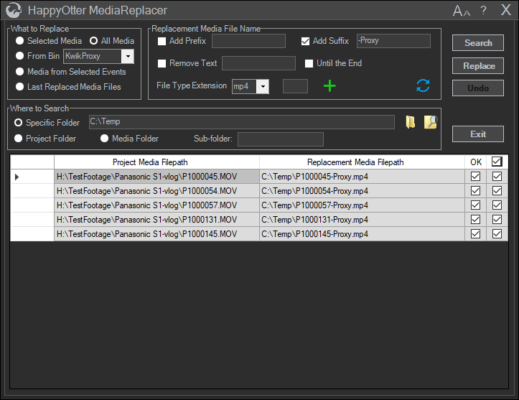
MediaReplacer
- Search and replace project media files with same or different file extensions
- Support for renaming options when searching for replacement files (E.g. added suffix)
New Features and Improvements
ImportAssist
- Added option to import mjpeg media files within an avi containerAC3 (stereo and 5.1)
- import now transcodes to lossless pcm wave file for Vegas 17 and 18AC3 (stereo and 5.1)
- import now transcodes to lossless pcm wave file for Vegas 17 and 18
KwikProxy
- Added option to search subfolders
- Disabled frame rate selection when Vegas Auto option is used
LoudnessToOpacity—added option to add or update just the render loop region
Bug Fixes
- LoudnessToOpacity—added option to add or update just the render loop region
- MediaRenamer—remove text until end not working correctly—fixedOtterBar,
- OtterInfoBar, OtterControl—shortcuts not working correctly for non-English users—fixed
- Toolbars and FrameServer not working for Sony V12—fixed
- ImportAssist
- Layout error adding to timeline when importing multiple 5.1 audio streams—fixed
- Crash for files in which the container’s audiostream preceded the videostream—fixed
- RenderEvents—warning messages not displayed correctly for UHD monitors—fixed
- AudioTrim—track selection for event renders not being honored–fixed
-
Wayne Waag
February 21, 2021 at 11:02 pmNew build 1.0.3.15 is now available.
Change log may be found here. https://tools4vegas.com/wp-content/uploads/HappyOtter-Change-Log.pdf
New Features and Improvements
- Reduced likelihood of AntiVirus false positives. This has been a recurring issue that is hopefuly fixed. New version and the now infamous OtterActivate.exe both tested clean in using VirusTotal.
- MediaReplacer—check added to insure that replacement file existsOpen Save Folder button added to all “Where To Save” dialogs for quick save folder access.
- Render+–added “by track” option so that loop, regions, and project may be rendered for selected tracks
- SmartVideoTrim—new version
- Improved speed and accuracy of frame matching algorithm using the autotrim option
- Audio remains in sync using both the keep existing and replace audio options
- Options for type of footage (camera vs rendered) and matching algorithm (exact vs closest)
Bug Fixes
- ImportAssist—regression in 1.0.3.14– ac3 only import not working—fixed
- RenderEvents—x264 renders for interlaced projects/media not working—fixed
- Preview not working in AviDub, RenderEvents, and RenderPlus– regression in 1.0.3.14—fixed
- Disappearing Vegas render templates in AviDub, ProxyAssist, RenderEvents, and Render+–fixed
- AviDub—save and use temp file options for direct renders not displayed correctly—fixed
- SpeedRamp—incorrect estimated time for new render—fixed



Reply to this Discussion! Login or Sign Up