

-

Wayne Waag
February 29, 2020 at 10:58 pmNew version 1.0.2.70 released. Change log may be found here. https://tools4vegas.com/wp-content/uploads/HappyOtter-Change-Log.pdf
New Versions of VirtualDub2, Nvencc64, Qsvencc64, Vceencc64**
New Features
o Added 422 x264 rendering support to RenderEvents and AviDub
o SmartVideoTrim- Option added to select bit rate when aac recoding is necessary
- For PCM audio in MP4 files, option to use older FFmpeg which copies PCM or newer version which demands the audio be recoded to AAC. Newer version used for other file types.
Bug Fixes
o ImportAssist– Newly created x264 templates not being immediately shown—fixed
o ProxyAssist– Selected encoder template in EncoderSettings not updated to main dialog—fixed
o AudioTrim– Selection of AAC renderer crashed Vegas—fixed
o RenderEvents–GPU assisted renders not working—fixed
o Preferences—crashed Vegas on some systems when running ToolFileSetup—fixed
o SmartVideoTrim—option to add audio from different source not working correctly—fixed** For AMD Radeon Users: The newest version of VCEEncC64 that supports VCE rendering, cannot be used in Win7. To continue using Win7, you must go to the folder “C:\Program Files\HappyOtterScripts” and delete the file “VCEEncC64.exe”. Then rename “VCEEncC64_Win7.exe” to “VCEEncC64.exe”.
wwaag
-
Wayne Waag
March 21, 2020 at 8:19 pmNew version 1.0.2.71 released. Change log may be found here. https://tools4vegas.com/wp-content/uploads/HappyOtter-Change-Log.pdf
New Versions: Virtualdub2, Nvencc64. QSVencc64, VCEencc64 plus most Avisynth plug-ins including 64bit version of Defish
New Features
- ImportAssist—crops gif files to make sure frame size is mod2 compatible necessary for x264
- RenderPlus—added PSNR and SSIM metrics to render stats when available
- ProxyAssist—added 4:3 frame sizes plus an option for a custom frame size
- AviDub—added support for both YUV and RGB FFmpeg renders for MagicYUV and UtVideo
- OtterMenu—added a “traditional” menu for launching HOS tools for those not using OtterBar or OtterInfoBar

- Significantly faster launch times for most HOS tools
Bug Fixes
- DeshakerRedux-mask creation not displayed correctly for 4:3 footage—fixed
- ImportAssist—import of multiple audio streams not added to timeline correctly–fixed
- RenderPlus—render folder location not saved correctly after new HOS install–fixed
wwaag
-
Wayne Waag
April 15, 2020 at 5:03 amNew version 1.0.2.73 released. Change log may be found here. https://tools4vegas.com/wp-content/uploads/HappyOtter-Change-Log.pdf
Beta testing extended for another month to 15 May.
New version of Qsvencc
New Features
- Otter NavBar—enables timeline navigation and track/event selection from within most scripts
- Preview render option added to AviDub and RenderEvents
- AviDub—re-designed UI with added favorites options for VirtualDub render templates
- Option to lighten/darken dialog controls with user input such as drop down boxes and textboxes
Bug Fixes
- AudioTrim—soloing an audio track led to gain increase in rendered audio file—fixed
- FxAssist—crashed Vegas if launched with no project or no tracks–fixed
Here are screenshots of Otter NavBar and the new AviDub.


wwaag
-
Wayne Waag
May 13, 2020 at 2:08 amAt long last, the first release version 1.0.3.1 is available and licenses may be purchased. There is also an option for a Free license.
Change log may be found here. https://tools4vegas.com/wp-content/uploads/HappyOtter-Change-Log.pdf
New versions of Avisynth+, Qsvencc64, Nvencc64, Vceencc64, UtVideo, MediaInfo, Exiftool
New Features
- AviDub—improved dialog for Avisynth to FFmpeg render options
- AudioTrim—auto selection of all, stereo, or mono tracks
- Common set of color matrix options for AviDub, ProxyAssist, RenderEvents, and RenderPlus.
Bug Fixes
- AviDub—Auto File tag not working when changing VirtualDub templates—fixed
- Lots of minor bug fixes and updates to tool dialogs
wwaag
-
Wayne Waag
May 23, 2020 at 10:04 pmNew build 1.0.3.2 is now available and licenses may be purchased. There is also an option for a Free license.
Change log may be found here. https://tools4vegas.com/wp-content/uploads/HappyOtter-Change-Log.pdf
New Features
- RenderPlus—added option to use media properties for event renders rather than project settings
- Added 422 and 444 chroma subsampling options for compatible codecs including X264, x265, MagicYUV, UtVideo, and Mpeg-2 (422 only) for all rendering tools (Render+, RenderEvents, ImportAssist, etc.)
- UHD monitor support
- ImportAssist-chapter information now shown when FileInfo is selected
- AviDub—added checkbox to enable RGB32 FrameServer renders thus eliminating the need for conversion inside of Avisynth for certain filters such as defish.
Bug Fixes
- ImportAssist—occasional duplicate markers produced during chapter import–fixed
- NavBar—navigating events would hang if events had transitions or blank spaces between events—fixed
- Color matrix setting of “None” now truly none with no conversion to YUV—previously defaulted
wwaag
-
Wayne Waag
June 13, 2020 at 10:39 pmNew build 1.0.3.3 is now available.
Change log may be found here. https://tools4vegas.com/wp-content/uploads/HappyOtter-Change-Log.pdf
New Features
- OtterBar and OtterInfoBar can now be resized similar to other dialogs
- Greatly improved UHD-high dpi monitor support
- Common set of save folders—i.e. save folder location from one script will be available to all others
- Improved folder browse dialogs
Bug Fixes
- ImportAssist—select audio stream dialog always shown regardless of checkbox to keep same—fixed
- ProxyAssist—keep audio for x264 renders always crashed—fixed
- RenderEvents and AviDub—template selection from main dialog not honored–fixed
Please advise if there are remaining problems for those with UHD monitors.
wwaag
-
Wayne Waag
July 11, 2020 at 8:42 pmNew build 1.0.3.4 is now available.
Change log may be found here. https://tools4vegas.com/wp-content/uploads/HappyOtter-Change-Log.pdf
New Features
- RenderPlus–direct audio render for Nvenc and QSV renders thus eliminating the need for remuxing; Added aac-adts as an Audio Only render option
- AviDub—added warning to close editor after editing Avisynth scripts and VirtualDub settings
- OtterBar and OtterInfoBar–Last layout saved and opened next time Vegas is launched; Added warning when layout is changed but not saved
Bug Fixes
- ImportAssist—select audio stream dialog always shown regardless of checkbox to keep same—fixed
- ProxyAssist—keep audio for x264 renders always crashed—fixed
- RenderEvents and AviDub—template selection from main dialog not honored–fixed
wwaag
-
Wayne Waag
August 3, 2020 at 3:38 amNew build 1.0.3.5 is now available.
Change log may be found here. https://tools4vegas.com/wp-content/uploads/HappyOtter-Change-Log.pdf
Support for Vegas 18
New Tool
KwikZoom – enables the user to quickly and precisely add keyframes to “Zoom In” and then “Zoom Out” of the timeline.

New Feature
AudioTrim – added option to insert project markers into rendered files when supported
Bug Fixes
AviDub – temp audio file not removed upon render completion—fixed
OtterInfoBar – changes to background and textbox colors not saved–fixedwwaag
-
Wayne Waag
August 16, 2020 at 9:16 pmNew build 1.0.3.6 is now available.
Change log may be found here. https://tools4vegas.com/wp-content/uploads/HappyOtter-Change-Log.pdfNew Tools
- SpeedRamp—enables user to gradually increase/decrease playback speed while maintaining audio sync

Some contents or functionalities here are not available due to your cookie preferences!This happens because the functionality/content marked as “Vimeo framework” uses cookies that you choosed to keep disabled. In order to view this content or use this functionality, please enable cookies: click here to open your cookie preferences.
Note that the source footage was 25P downloaded from YT.- OtterBar2—added second taskbar for users requiring additional space for launching scripts
New Features
- RenderPlus – direct audio render for VCE renders thus eliminating need for remuxing
Bug Fixes
- Folder Browse exception—fixed
- RenderPlus—incorrect Avisynth crop setting icons loaded after crop—fixed
- Better exception handling during FrameServer installation
Last changed by wwaag on 8/16/2020, 2:01 PM, changed a total of 1 times.
wwaag
-

Chris Hewitt
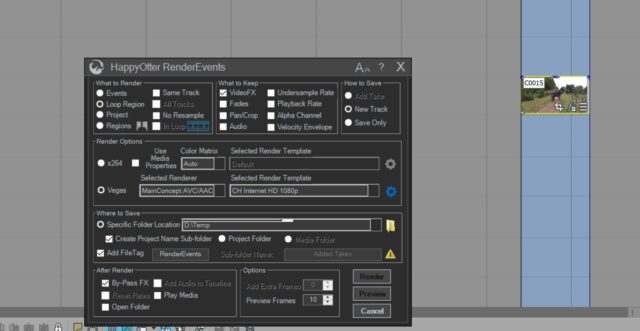
October 2, 2020 at 7:31 pmHi Wayne, I’ve been trying out the demo for a while and ready to buy but I have one problem (see attached screenshot).
I’m using Vegas Pro 17 and want to render a small event to a new track that has a Mercalli 4 effect on it. The screenshot shows that the RENDER button is greyed out. Not sure where I’m going wrong here.


Reply to this Discussion! Login or Sign Up