Creative Communities of the World Forums

The peer to peer support community for media production professionals.

Activity › Forums › Adobe After Effects Expressions › Expression for (Trapcode Particular) 3 color ramp/gradient

  • Expression for (Trapcode Particular) 3 color ramp/gradient

    Posted by Floris De kok on November 9, 2020 at 11:22 am

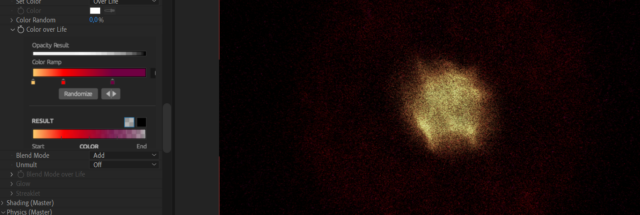
    Hello, I’ve recorded some music and transformed the audio levels to 3 value controllers (of base, mid and high tones). I want to link not only the particles/second to the controllers, but also the color, with the ‘Color over Life’ function. However, I don’t know the expression to control the 3 color values and link them to the controllers, so that a base tone will create a different color than a mid or high tone. Right now I just duplicated the particular layer 2 times, gave each of them different colors and linked each of those to a different controller. However, I would like to see the effect of having just one layer and controlling the color ramp with an expression. Any suggestion(s) on how that can be done?
    Many thanks!
    Floris De kok replied 5 years, 10 months ago 2 Members · 3 Replies
  • 3 Replies
  • Filip Vandueren

    November 10, 2020 at 4:12 pm

    They are a special kind of keyframe whose value cannot be manipulated with expressions.

    You can however set a few different keyframes, and use an expression with valueAtTime() to dynamically choose/interpolate between those keys.

  • Filip Vandueren

    November 10, 2020 at 4:18 pm

    Alternatively, you could just keep the gradient from White to Black, and use a TriTone effect where you can effect the 3 colors with expressions.
    The result of thosee expression will have to be an array of length 4:
    [r,g,b,a];

    but alpha will be ignored

  • Floris De kok

    November 11, 2020 at 12:09 pm

    Many thanks Filip, I’ll look further into your suggestion:)

We use anonymous cookies to give you the best experience we can.
Our Privacy policy | GDPR Policy