Creative Communities of the World Forums

The peer to peer support community for media production professionals.

Activity Forums Adobe After Effects Expanding or eliminating artboard border of imported AI file?

  • Expanding or eliminating artboard border of imported AI file?

    Posted by Camilo Fontecilla on October 13, 2020 at 11:20 pm

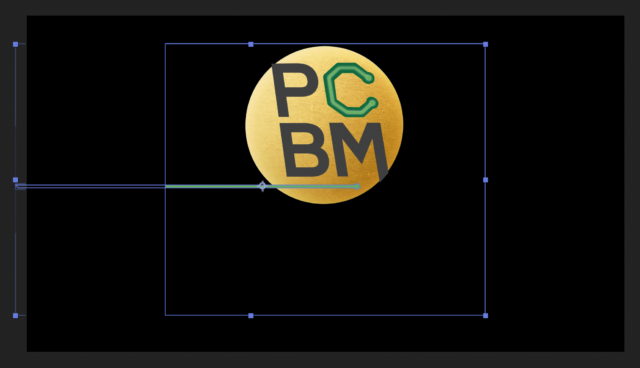
    Hello– I’ve imported an AI logo with each element in a different layer. I noticed each layer’s shape is that of the original AI artboard. This was fine until I got to a layer I want to animate by extending it all the way to the edge of the comp. I’m finding that when I drag the vertices to the left of the comp to lengthen my vector, they disappear once they extend past the left border of the original AI artboard. Can I somehow redefine the artboard size in AE, or just get rid of it so the vector has its own borders?

    See attached image since I’m sure my explanation is not clear. 🙂 Note how to the left of the blue box (the original artboard border) the green vector is not visible. I want to make that visible.

    Thanks!

    Daniel Griffin replied 5 years, 6 months ago 2 Members · 1 Reply
  • 1 Reply
  • Daniel Griffin

    October 15, 2020 at 3:59 am

    Why don’t you expand the artboard in illustrator? Select the layer with the problem n After effects, press CRTL + E. This will open Illustrator. Go to Artboard editing mode and expand the artboard to your liking. Save and go back to After Effects. The problem should be solved. I hope this helps. Cheers!

We use anonymous cookies to give you the best experience we can.
Our Privacy policy | GDPR Policy