-
Edit Youtube 1080p25 livestream in FCP
We do Livestream on theater plays (Theatre School) through two different ways.
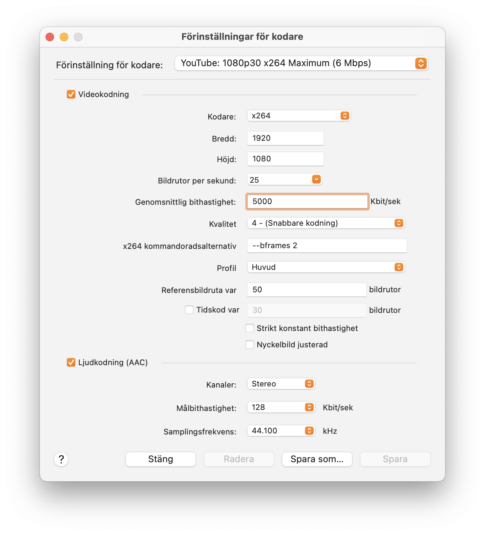
Direct to Youtube 1080p25, x264, 5 Mbit/s or the same settings through restream.io and restream it to Youtube and some times to other platforms as Facebook.
After the Livestream we download the stream and edit it so all students can have there own copy of the play.
The problem is.
YOUTUBE
While streaming it is 25p but Youtube recode it direct after to 30p witch is what we can download 1080p30 .mp4 it looks ok but little spoky and jumpy when it is big movements on scen.
RESTREAM.IO
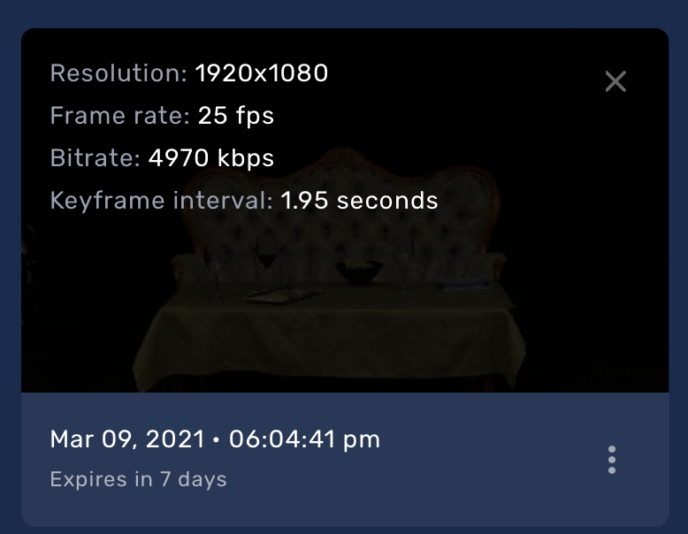
If we use reastream.io same setting it is possible to download the 1080p25 stream from their cloud. But it is very jumpy, not god at all – colors are god.
It bothers me that “Keyframe interval: 1.95 seconds” and could that be the jumpy problem.
Is it possible to fix it?
GOOGLE TAKEOUT
This is the method that actually gives the best result i one way. But then we get at .webm 1080p30 (VP9) not original 25 p – the colors looks to saturated compared to original.
Is it any way to get the original 25p stream from Youtube?
FCP import VP9 (.webm)
What tool should I use to recode VP9 (.webm) to what ProRess quality.