-
“Crop Comp to Region of Interest” but for Solids?
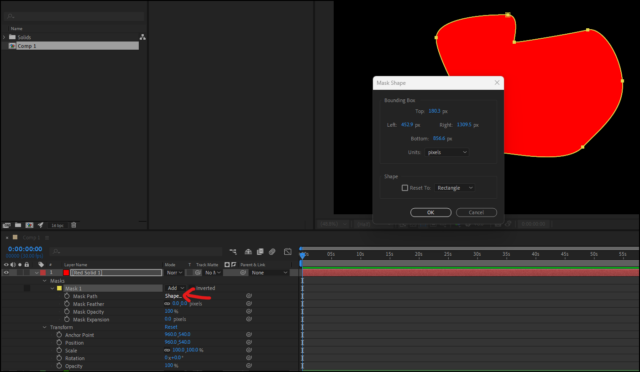
There isn’t a way to resize a Solid layer in After Effects similar to how you can resize a composition using the “Crop Comp to Region of Interest” method, is there? I know I can add a mask to a Solid layer to crop it, or I can go into the Solid’s settings and change the dimensions there, but what I’m wondering is whether there might be a way to draw a mask or region of interest, and then crop the Solid’s dimensions down that way.
You may wonder why just a mask or changing the Solid’s dimensions after-the-fact is not good enough for what I’m trying to do—this all has to do with Video Copilot’s free plugin called Saber.
If I:
-
Create a Solid within a 3840×2160 comp making the Solid the same size of the comp
-
Add Saber to that Comp
-
Adjust the Saber settings to my liking such that the entire visual extent of the Saber effect only takes up a 600×400 pixel area of the comp
…just that Solid layer will use up about 200ms of render time on my machine. Not very long by itself, but with a complex composition with a bunch of other layers eating the time up, it adds up!
If, instead, I start with a solid that is 600×400 pixels, and set up the same Saber effect (same settings and same effective size and position), it will only take up about 10ms of render time. In other words, the size of the Solid the Saber plugin is added to can make a significant render time difference, even if the visual extent of the Saber effect only takes up just a small portion of the overall layer dimension.
So, for best practices, you should obviously start with a Solid that is only as big as you think it will need to be. The problem is, depending on the project, you might not always know at the beginning how much visual space the effect would take up. And if you start with a Solid that is the size of the comp and then try to reduce its dimensions later using the Solid Settings dialog, your Saber effect will shrink too. So you end up having to re-size and re-position what you had previously spent a lot of time on getting right.
Adding a 600×400 mask to the Solid layer does not seem to cut down on the render times. Only actually reducing the Solid dimensions has made an appreciable difference in the tests I’ve done so far.
So some kind of “Crop Solid to Region of Interest” tool would be awesome here, but I realize this is a REALLY edge case situation. I haven’t yet tested to see if this same concept is true for other effects, like say, Trapcode Particular, or something like that.
-