-
Controlling frame by frame time remapping with a dropdown expression control?
I have a ‘lesson card’ precomp with four options of icon, each representing a type of lesson. Within the precomp are four frames, each showing a different icon.
Doing this manually for each one would be a case of going in and setting the lesson card precomp’s time remapping to 0:00:00:00 for reading, 00:00:00:01 for grammar, 00:00:00:02 for listening and 00:00:00:03 for speaking.
However, I’d like to make a dropdown expression control to choose which type of lesson each ‘lesson card’ precomp will be.
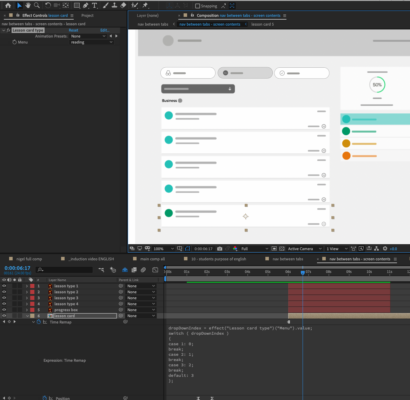
I think I’ve figured out the way to write the expression bit for the dropdown (see screenshot) but I can’t find any information on how to use an exact time remapped value as an option (I’ve just put 0, 1, 2 and 3 in the example). See below for my start on it.
How would I write the equivalent of 00:00:00:01, 00:00:00:02 etc etc (and is the first bit more or less correct)?PS I’m aware there’s other ways I could probably do this, but I really want to understand how this works for future stuff!
dropDownIndex = effect(“Lesson card type”)(“Menu”).value;
switch ( dropDownIndex )
{
case 1: 0;break;
case 2: 1;
break;
case 3: 2;
break;
default: 3
};