Creative Communities of the World Forums

The peer to peer support community for media production professionals.

Activity Forums Adobe InDesign Color of photo depends on importing (or not) …another photo… Weird.

  • Color of photo depends on importing (or not) …another photo… Weird.

    Posted by Michal Poniedzielski on March 2, 2011 at 4:03 pm

    Hi!

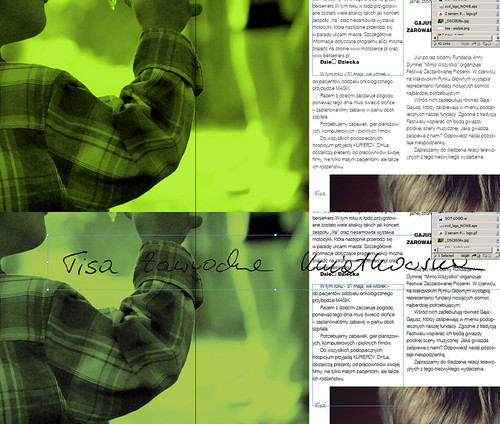
    This is a screenshot:

    Upper part shows composition on the start. And lower part shows what happens when I place in that page a new object – TIFF file with transparency (this black signature). The green color of the photo on the left changes, fades a bit.

    When I import regular jpg without transparency – everything is OK.

    And one more thing: please notice part of the photo with hairs on the bottom right – it doesn’t change the color!! (It doesn’t matter that the signature is not overlaping the hairy photo – I’ve checked that too)

    I’ve checked those two files files (the green one and those hairs) – their properties seems to be identical:

  • there’s no color profile embedded
  • both 8 bit
  • both RGB
  • What elce can I check to solve this problem. Or maybe it’s only VIEW of that colors, and they will be the same when printed?

    Please help if you know what to do.
    Thx.

    PS: (Indesign CS5)

    http://www.vimeo.com/micz

    LAPTOP: Sony Vaio VPCF11S1E: Intel Core i7 (1.6 GHz) | 6GB RAM | GeForce GT 330M | Win7 x64 Home |
    DESKTOP: Intel Core 2 Duo E6600 | Asus P5B Deluxe | 4GB RAM | GeForce7200 | Windows XP Pro SP3

    gajusz01

Michal Poniedzielski replied 15 years, 5 months ago 2 Members · 2 Replies
  • 2 Replies
    • Terry Mikkelsen

      March 5, 2011 at 2:16 am

      Turn on separations preview. (Window>Output>Separations Preview or Shift+F6)

      Are the colors now consistent with or without the black signature?

      Tech-T Productions
      http://www.technical-t.com

    • Michal Poniedzielski

      March 7, 2011 at 12:35 am

      Thanks man, it helped! 🙂 Now – despite the signature is present or not – colours remain the same.

      Could You please enlight me a bit more by the way? What is this separation preview for? I know, that I could ask too much – since it’s a part of PRINTING MAGIC, told to be the hardest thing to learn in digital world 🙂 – but can You at least put my further investigations in the right direction?

      I would be greatful, because those printing matters are hard to explore without a guidance :/

      http://www.vimeo.com/micz

      LAPTOP: Sony Vaio VPCF11S1E: Intel Core i7 (1.6 GHz) | 6GB RAM | GeForce GT 330M | Win7 x64 Home |
      DESKTOP: Intel Core 2 Duo E6600 | Asus P5B Deluxe | 4GB RAM | GeForce7200 | Windows XP Pro SP3

    We use anonymous cookies to give you the best experience we can.
    Our Privacy policy | GDPR Policy