Creative Communities of the World Forums

The peer to peer support community for media production professionals.

Activity Forums Maxon Cinema 4D Cinema 4D 2025 — Roller Coaster Train Rig: Flipping Constraints and Coupler Setu

  • Cinema 4D 2025 — Roller Coaster Train Rig: Flipping Constraints and Coupler Setu

    Posted by Felipe Vallejo on March 6, 2026 at 4:29 pm

    Hi everyone,

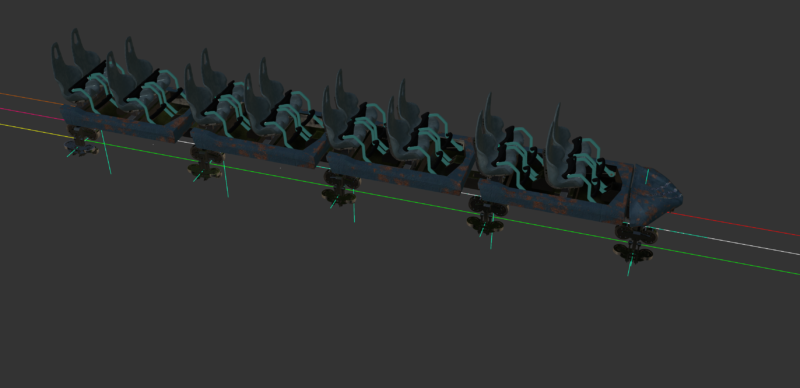
    I’m rigging a roller coaster train in Cinema 4D 2025 and running into two persistent issues. Would really appreciate any experience or advice.

    THE SETUP

    The train has four cars with five bogies total:

    – Car 1 has a front and rear bogie

    – Cars 2, 3 and 4 each have one rear bogie

    The track system has three connected splines:

    – Track 01 — train moves forward

    – Track 02 — train reverses backwards

    – Track 03 — train moves forward again

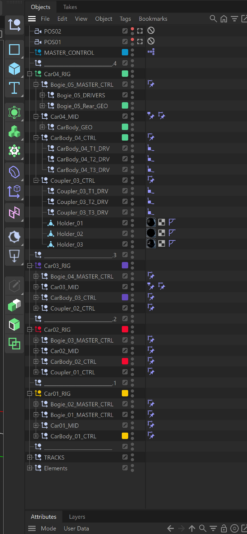
    Each bogie has three driver nulls (T1_CTRL, T2_CTRL, T3_CTRL), each with an Align to Spline tag linked to their respective track. An Xpresso network drives the ATS position values and switches constraint weights between tracks as the train progresses. This part is working correctly.

    Each car body sits between its two bogies, controlled by a MID null with a Transform constraint averaging position and rotation between the front and rear bogie (50/50).

    ISSUE 1 — RANDOM 180 DEGREE FLIPPING

    Car 03 and Car 04 randomly flip 180 degrees at specific points along the track, particularly during Track 02 and Track 03. The flip is not consistent — it happens at specific Distance values and then corrects itself further along.

    I believe this is a gimbal lock issue caused by the Transform constraint averaging rotations between two bogies. When the bogies reach certain relative angles on curves, the rotation interpolation flips through the shortest path which happens to be 180 degrees the wrong way.

    Things I have already tried:

    – Separating position (P only, 50/50 Transform) from rotation (R only, Parent constraint targeting front bogie at 100%)

    – Setting explicit evaluation priorities on all tags

    – Deleting and recreating the constraint tags fresh

    – Freeze Transformation on all geometry

    The flip persists on Track 03 even with the separated P/R approach.

    ISSUE 2 — COUPLER RIGGING

    Each coupler connects the rear of one car to the front of the next. The Coupler_CTRL already has a Parent constraint targeting three driver nulls (T1_DRV, T2_DRV, T3_DRV) which is driven by the Xpresso weight system to switch tracks — this must stay.

    The problem is getting the coupler to also physically sit between its two bogies and rotate correctly with the track, without conflicting with the existing constraint.

    Adding additional Transform and Parent constraints to the Coupler_CTRL causes the couplers to jump to random positions, especially when selected in the Object Manager.

    QUESTIONS

    1. What is the most reliable way to prevent 180 degree rotation flipping when using Transform constraints to average rotation between two objects in C4D?

    2. Is there a clean way to stack multiple constraints on the same object without them conflicting — specifically combining an ATS-driven Parent constraint with position/rotation constraints targeting other objects?

    3. Would a different approach entirely work better here — for example using expressions, spring constraints, or a different constraint type?

    Happy to share more details, screenshots or the file if helpful. Thanks in advance!

    Kouraib Abdmalek
    replied 2 months ago
    2 Members · 4 Replies
  • 4 Replies
  • Kouraib Abdmalek

    March 7, 2026 at 10:12 am

    Hi Felipe,

    Regarding the cart fliping issue, I believe it can be resolved by enabling the Tangential option in Align to Spline, then copying track and move it vertically above the cars, then dragging and dropping it into the Rail path (I will include a screen recording of this). As for the second issue, I think it requires the file checking (even a simplified version) along with a screen recording demonstrating the problem. hope this will be helpful.

  • Felipe Vallejo

    March 7, 2026 at 12:25 pm

    Hi Kouraib,

    Thank you so much for this — really helpful suggestions. I will test it I appreciate you taking the time to explain it.

    Regarding the coupler issue I have been going in circles trying different constraint combinations and a fresh pair of eyes on the actual setup would be invaluable.

    https://drive.google.com/file/d/1SWJhVVVLik9ZIEZ8QctufLv260YSRHM5/view?usp=sharing

    The actual rigging is where I am least confident and where I have found the most challenging work. The mechanical rigging is not my strongest area, and I think that is the reason the overall setup has become so complex. Any thoughts on a cleaner approach to rigging the cars and couplers would be really appreciated.

  • Felipe Vallejo

    March 13, 2026 at 4:53 pm

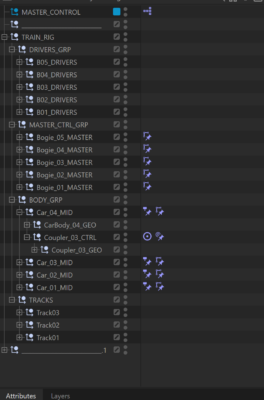
    I managed to get it working. It ended up being a hierarchy issue — I received some feedback on the correct structure, set it up with one train rig without individual cars, and that solved things. Everything works correctly on Tracks 01 and 02.

    However, on Track 03 we can’t get the bogies to orient properly using the Rail Path. Using the RIGHT rail spline results in a 90° pitch, and using the LEFT rail spline causes a 180° flip. Reversing either spline and trying all six axis options doesn’t fix it. The spline geometry looks correct in the viewport. Does anyone know if there’s a way to control the axis direction?

    I also have another issue with the rigging. Rigging isn’t my strongest area, and although the train follows the track properly, the cars don’t seem to be attached to the bogies — as you can see in this GIF. I’ve looked into car‑rig setups but still can’t get them to work correctly. Any advice would be greatly appreciated.

    https://drive.google.com/file/d/1ikL84kVkP1MbxVJW6NhxW9kaLWkZg_H4/view?usp=sharing

    https://drive.google.com/file/d/1k7y0y_stlF0j9tcZq4IMT5Qe6d0H51lZ/view?usp=drive_link

  • Kouraib Abdmalek

    March 14, 2026 at 7:48 am

    I was looking for a file of a similar project I had done previously to send you, but it seems you’ve done a fantastic job as clearly shown in the screenshot of the Object Manager panel. Congratulations! Regarding the overturning of the carriages, as I stated before, you should copy the track and move it vertically above the current track then make it as rail path for the carriages. I don’t know if you’ve tried this, using the same track path as rail path, or even deplicate it but leaving it in place, causes the overturning issue. I’ve struggled with this before. As for the carriages being connected, they don’t appear to be unconnected to the locomotive. Perhaps setting the locomotive alone as camera target is what made you think that. You could make the entire train as target, or choose a middle carriage to confirm. I hope this is helpful.

We use anonymous cookies to give you the best experience we can.
Our Privacy policy | GDPR Policy