-
Cinema 4D 2025 PSD Object Buffers Import as Channels Instead of Layers in After
I’m having a workflow issue between Cinema 4D 2025, Adobe Photoshop 2026, and After Effects 2026, and I’m hoping someone can help.
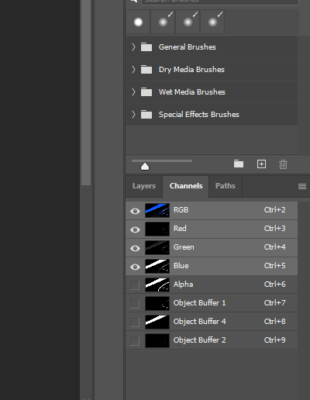
I rendered 400+ frames in Cinema 4D 2025 using the Physical Renderer with Multi-Pass enabled, including several Object Buffer passes. I exported the render as a PSD sequence.
The issue is that all of the Object Buffer passes are saved as Photoshop Channels (Alpha Channels) instead of separate layers. When I import the PSD sequence into After Effects 2026, the PSD imports as a single layer, and none of the Object Buffer channels appear as individual layers or passes.
My goal is to:
-
Import the PSD sequence into After Effects.
-
Access each Object Buffer separately.
-
Use the Object Buffers as masks/mattes for individual objects.
-
Apply different effects and color corrections to each object independently.
Is there a way to make After Effects recognize the Photoshop channels as separate layers, or is there a better export workflow from Cinema 4D 2025? Should I render the Object Buffers as separate image sequences instead of embedding them in the PSD?
Software Versions:
-
Cinema 4D 2025 (Physical Renderer)
-
Adobe Photoshop 2026
-
Adobe After Effects 2026
Any guidance or recommended workflow would be greatly appreciated. Thanks!

-