

Activity › Forums › Adobe After Effects Expressions › Changing the font style with Dropdown Menu Control
-
Changing the font style with Dropdown Menu Control
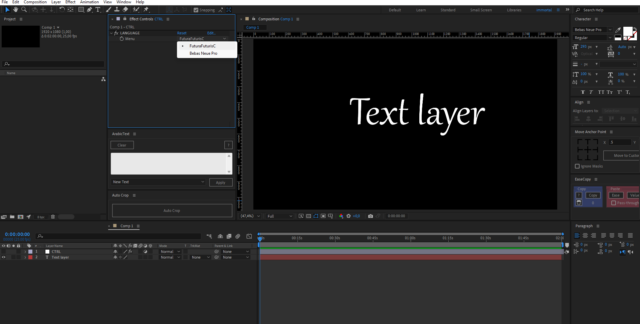
Posted by Dmitriy Khomyakov on June 17, 2023 at 4:48 pmHello, friends. I need your help. It is not possible to write an expression for changing the font through the Dropdown Menu Control.
Help write!
 Brie Clayton replied 3 years, 3 months ago 3 Members · 11 Replies
 -
11 Replies
-

Dan Ebberts
June 17, 2023 at 6:03 pmYou can do it, but your expression has to contain the actual font names (which may not match exactly the names in your dropdown). So the expression might look like this for “Arial”, “Bookman Old Style”, and “Lucida Console”, for example:
m = effect("LANGUAGE")("Menu").value;
switch(m){
	case 1:
		font = "ArialMT";
		break;
	case 2:
		font = "BookmanOldStyle";
		break;
	case 3:
		font = "LucidaConsole";
		break;
	default:
		font = "ArialMT";
		break;
}
style.setFont(font) -

Dmitriy Khomyakov
June 17, 2023 at 6:22 pmunfortunately does not work. Maybe you know what the problem is?
-
Dmitriy Khomyakov
June 17, 2023 at 6:26 pmI found such an article, this is just what I need, but for some reason it does not work for me
https://creativecow.net/forums/thread/setting-font-and-font-size-stylesetfont-stylesetf/
Setting Font and Font Size (style.setFont & style.setFontSize) AE 2020 issue
-
Dan Ebberts
June 17, 2023 at 6:28 pmSorry, I missed the fact that you had the menu control on a separate layer. Try changing the first line to this:
m = thisComp.layer("CTRL").effect("LANGUAGE")("Menu"); -
Dmitriy Khomyakov
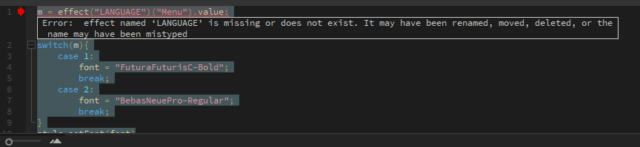
June 17, 2023 at 6:34 pmAgain an error. Can you please correct me in the AE file (attached)
-
Dan Ebberts
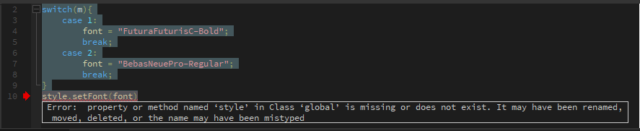
June 17, 2023 at 6:40 pmYou have the expression engine set to Legacy Extendscrpt.
set File > Project Settings > Expressions > Expressions Engine to JavaScript.
-
Dmitriy Khomyakov
June 17, 2023 at 6:58 pmIt doesn’t work for me :((
I need Expression because everything else in the project is built on Expression
-
Dan Ebberts
June 17, 2023 at 7:26 pmAre you saying that you have expressions in your project that require the Legacy ExtendScript expression engine? If so, are there too many to just fix the expressions?
-
Dmitriy Khomyakov
June 17, 2023 at 7:45 pmI will punch.
And your expression in Java works, I switched it and it all worked. Thank you!
Reply to this Discussion! Login or Sign Up