Creative Communities of the World Forums

The peer to peer support community for media production professionals.

Activity Forums Maxon Cinema 4D Change the filename, depending on what the scene is. (R21/Redshift)

  • Change the filename, depending on what the scene is. (R21/Redshift)

    Posted by Gunnar Kvilhaug on August 15, 2021 at 3:04 pm

    Hello!

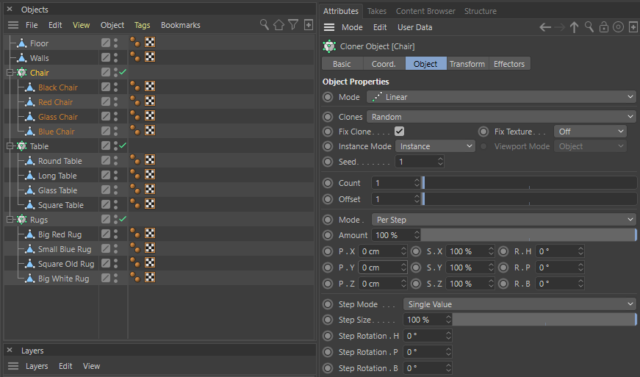
    I am working on a client project, where my goal is to generate around 100 to 150 different interior renders. The room contains of one rug, one chair and one table. See my setup on attached image.

    I solved this by creating three different cloners, with random mode on. Then filled the cloners with the different tables, rugs and chairs. The only thing I have to do now, is to animate the seed then render out how many frames I need. Now all my renders contains a unique interior-setup.

    Great!! ….but. Now I have 150 files with filenames like: projectname_001.png

    Is there any way to showcase in the metadata or even better, the filename. What kind of objects that is showing in my scene?

    My setup does not have to be like I have described above, as long as it does the same job.

    I am sure there is a way to either do this with tokens, or xpresso. But I have no skills at all in Xpresso, but would love to use it if this can solve my problem.

    Any help is greatly appreciated!

    G

    Gunnar Kvilhaug replied 4 years, 9 months ago 2 Members · 2 Replies
  • 2 Replies
  • Justin Thomson

    August 15, 2021 at 7:27 pm

    Perhaps you may want to try the “takes” system. Each take can have its own camera and render settings. Also in the batch render you can add all your takes, then you only need one file.

  • Gunnar Kvilhaug

    August 16, 2021 at 8:13 am

    Thank you for replying!

    My example above is a very simplified explanation of my real case.

    In my real case I have a setup with five cloners that contains 10-15 objects. So if I should use the take system I have to manually set up each take. The final renders will be around 1000 frames.

We use anonymous cookies to give you the best experience we can.
Our Privacy policy | GDPR Policy