Creative Communities of the World Forums

The peer to peer support community for media production professionals.

Activity Forums Maxon Cinema 4D Change axis facing in null object?

  • Change axis facing in null object?

    Posted by Tim Vining on December 23, 2020 at 1:24 pm

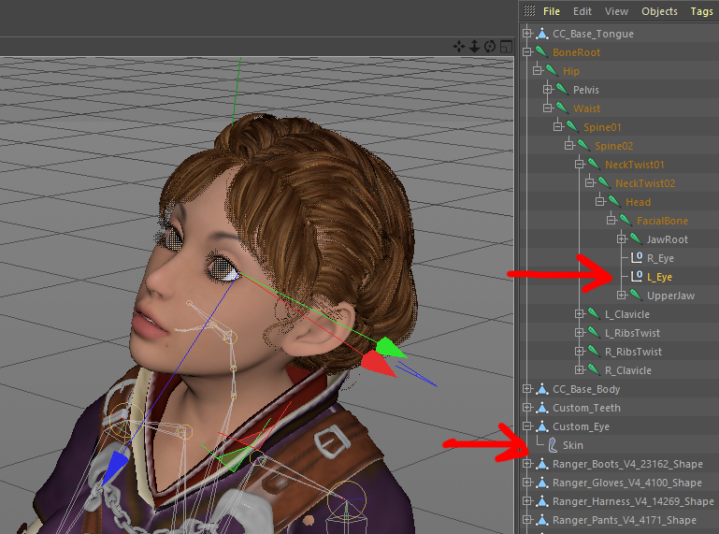
    I’m not an expert in bones, so I hope this isn’t too nooby a question, but I want to use “Target” on the eyes of this figure (attached), but Target gets all wonky since it wants to use the Z axis, which in this case is facing down. I tried Enable Axis on the nulls (upper red arrow) but it rotates the object, and doesn’t change the axis. I want to get the Z axis to point “forward” of the eye. Is there a command/method that I’m missing? (I apologoze for the double image post–not sure how to get rid of one.)

    Tim Vining replied 5 years, 4 months ago 1 Member · 1 Reply
  • 1 Reply
  • Tim Vining

    December 23, 2020 at 9:06 pm

    Update: I figured out a relatively simple solution: I used Group Object on each eye null inside the bone hierarchy and used Enable Axis to swing the Z axis around to point forward, and put a Target tag on each of the new nulls. Seems to work pretty well.

We use anonymous cookies to give you the best experience we can.
Our Privacy policy | GDPR Policy