-
Can’t find a way to maintain subtitle formatting when sending to Vimeo
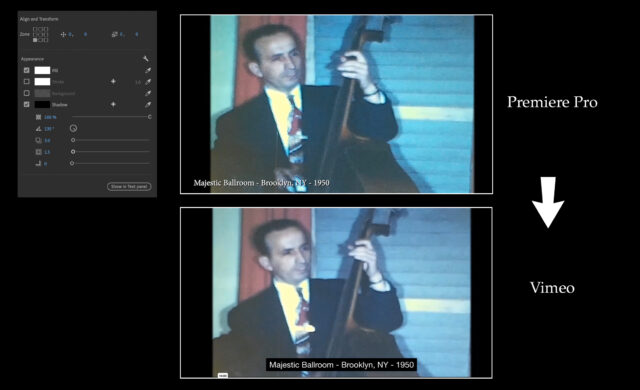
I can’t seem to find the solution to keep the location, drop shadow, and background formats when creating captioning in PPro across to Vimeo. In PPro, I created the captions as “subtitle” so it gave me formatting options in Essential Graphics panel. CEA-708 does not offer those options. I justified titles lower left, white text, with drop shadow, no background. By the time it gets to vimeo, it’s white text on a black background, centered. See image.
Heres what I’ve tried:
– From captions panel, exported as .rst (since WebVTT does not appear to be available in PPro). I understand Vimeo prefers WebVTT format. I ensured it did it with the UTF-8 encoder. Converted that .srt file from a few 3rd party converters to .vtt then imported to Vimeo, but all the results were the same: white text on black background, centered.
– I tried to export video through “export>media” and selected the “create sidecar file option” for captions, and checked the box that said “include SRT styling”. I used that file and again did a 3rd party conversion to vtt. Same result.
I did inspect the .srt file in TextEdit and noticed there were no formatting type notations. I also checked the converted .vtt files and it did have the WEBVTT header, and all commas in timecodes were replaced with decimal points. I couldn’t find any options within Vimeo to address this.
Am I missing something else?
Thanks