-
C4D exporting the wrong frames
Hey everyone, hoping you can help me with a strange and rather annoying bug I’m experiencing with C4D. I was rendering a project through the render queue and experienced a crash. No big deal, it’s redshift this stuff happens. So I reopen the project, which I had to save to add to the render queue, so I expect I can just resume my render and it should give me the missing frames. When it shows the job as completed and I go to compile my frames I noticed I’m missing a bunch of frames.
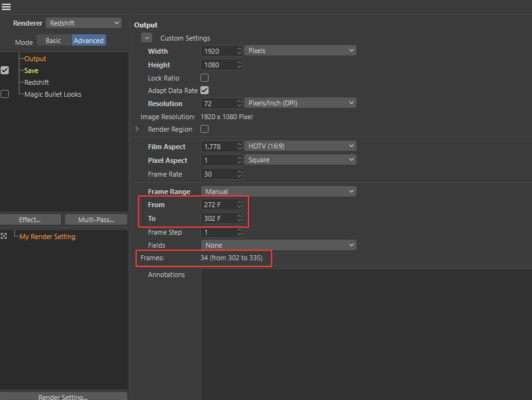
It seems that whenever I’m setting a specific frame range to render, it’s rendering other frames. I’m attaching a screenshot here where you can see that although my frame range is set to manual, and I have set a specific From and To range, below it’s giving me a different range that it’s going to export. Is this a bug? Or has something been messed up in my file with the crash?
Thanks in advance!