Creative Communities of the World Forums

The peer to peer support community for media production professionals.

Activity Forums Adobe After Effects BUG: Random layers have no blend modes and do not visibly have motion blur.

  • BUG: Random layers have no blend modes and do not visibly have motion blur.

    Posted by Scotty Kunkel on December 16, 2021 at 2:04 pm

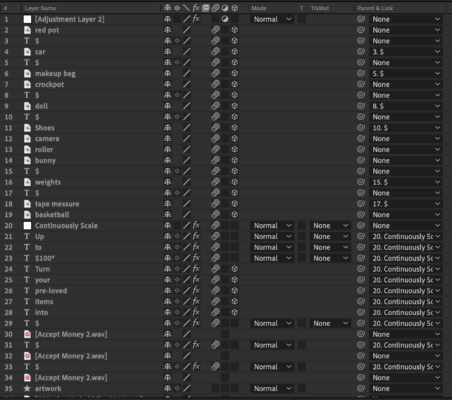
    There are seemingly random images, layers, text layers, shape layers, that do not have options for blend modes. Even more annoying is that those same layers visibly do not have motion blur while other layers do. I’ve resorted to putting an adjustment layer with CC Force Motion Blur for the time being. Any idea why might this be?

    Walter Soyka replied 4 years, 8 months ago 2 Members · 1 Reply
  • 1 Reply
  • Walter Soyka

    December 16, 2021 at 2:32 pm

    This is not a bug — this is expected behavior for 3D layers with the CINEMA 4D renderer.

    If you change your comp back to the Classic 3D renderer, you’ll get blend modes and motion blur back (but of course you’ll lose extrusion).

    You can find this in the Comp Settings window (under 3D renderer), or there’s a dropdown menu on the lower right corner of the viewer panel.

We use anonymous cookies to give you the best experience we can.
Our Privacy policy | GDPR Policy