Creative Communities of the World Forums

The peer to peer support community for media production professionals.

Activity Forums Adobe After Effects Expressions Avoid re-calculating array every frame

  • Avoid re-calculating array every frame

    Posted by Adam Levy on June 23, 2023 at 2:09 pm

    Hi all!

    I’m working on a project where I use a csv to draw a line graph (via a path). Simple enough.

    Except it takes a loooong time to do this – a problem since I’m animating the graph.

    It seems the slow part is reading the data from the csv into the array, rather than the actual processing of the data or the drawing to path.

    My question is: would it be possible to read the csv data and assign it to the array only once? And then each frame I can just adjust the animation?

    I guess what I’m asking for is some way of storing the array I get – assigning it to a global variable or something.

    Thanks in advance!

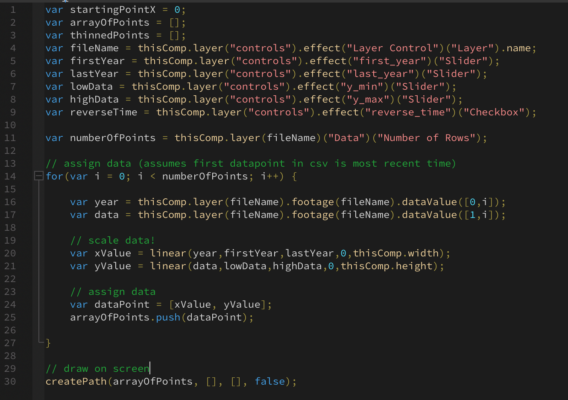
    p.s. I’ve attached a simplified form of the code – can also paste the text for this if it’s helpful

    Brie Clayton
    replied 2 years, 10 months ago
    3 Members · 3 Replies
  • 3 Replies
  • Filip Vandueren

    June 23, 2023 at 6:46 pm

    (Pseudo code)

    On a textLayer, use an expression that starts with posterizeTime(0), and that ends with JSON.stringify(theArray);

    You can now JSON.parse(arrayTextLayerSourceText) in a different expression to read in the array which only got calculated once.

    There are workarounds to use actual global variables via properties of the $-object, (they will stay the same until you re-assign or restart the app) but it is unsupported and can be buggy.

  • Adam Levy

    June 25, 2023 at 9:09 pm

    oo this is very nifty – thank you!

  • Brie Clayton

    June 25, 2023 at 10:37 pm

    Thank you for your solve, Filip!

We use anonymous cookies to give you the best experience we can.
Our Privacy policy | GDPR Policy
