-
Audio Settings aren't doing what I tell them to do.
Okay so small bit of a repost but new important information has come to light.
So my set up.
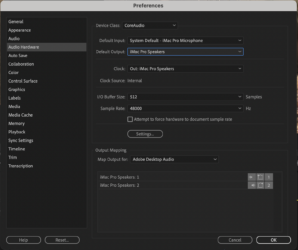
I’m on a iMac Pro. I go from a thunderbolt to my UltraStudio 4k and then SDI1 into my Flanders Scientific. I use this solely for color grading. Sense the very beginning I’ve only been using it for color grading and have had my audio hardware > Default Output: iMac Pro Speakers (or my speakers when I’ve had the room to plug them in. I mean Flanders Scientific has speakers on it but it’s not designed for crisp audio. So to be clear my Default Output: is set to iMac Pro Speakers NOT to UltraStudio 4k
well today for no reason my audio just stopped coming out of my speakers. Sequence audio wasn’t muted, Default Output was set correctly, needle was dancing but nothing. I’d been on here for a few hours asking for help while throwing ANYTHING at the troubleshoot wall seeing what stuck when I tried this.
I turned on the Flanders Scientific monitor and there’s my audio. Once again, even though all of my audio settings are set to my iMac Pro Speakers, and i’ve set and reset them. I’ve set everything to my UltraStudio 4k and then set it back but it’s still only playing through my Flanders Scientific… does anyone have ANY idea what is going on and how i can solve it.