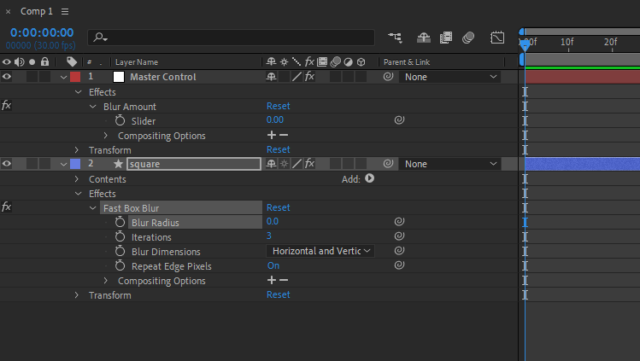
It’s possible if all you’re interested in is the very specific case you mention: the script checks to see if the Blur Radius property is selected, and if so, builds an expression to that property and applies it to the Master Control layer’s Blur Amount slider. However, it gets a lot more complicated in a hurry if you’re looking for a general solution that has to figure out which control on the Master Control layer gets the expression, based on what type of property is selected, or if the selected property might be something other than Fast Box Blur’s Blur Radius.
Assuming that your goal is just the specific case you mentioned it might look like this:
var myComp = app.project.activeItem;
var myProps = myComp.selectedProperties;
var myLayer = null;
for (var i = 0; i < myProps.length; i++){
if (myProps[i].propertyType == PropertyType.PROPERTY && myProps[i].name == "Blur Radius" && myProps[i].parentProperty.name == "Fast Box Blur"){
myLayer = myProps[i].parentProperty;
while (myLayer.parentProperty != null){
myLayer = myLayer.parentProperty;
}
var myExpr = 'thisComp.layer("' + myLayer.name + '")("Effects")("Fast Box Blur")("Blur Radius")';
myComp.layer("Master Control").property("Effects").property("Blur Amount").property("Slider").expression = myExpr;
break;
}
}
But as I mentioned, anything more general this, while certainly possible, gets messy in a hurry.