-
After Effects Keyframe’s Path not showing when doing Motion Tracking
Hi, I’ve spent the entire day on this and tried to get help form Adobe but the forum kept crashing… I really hope someone can help me out.
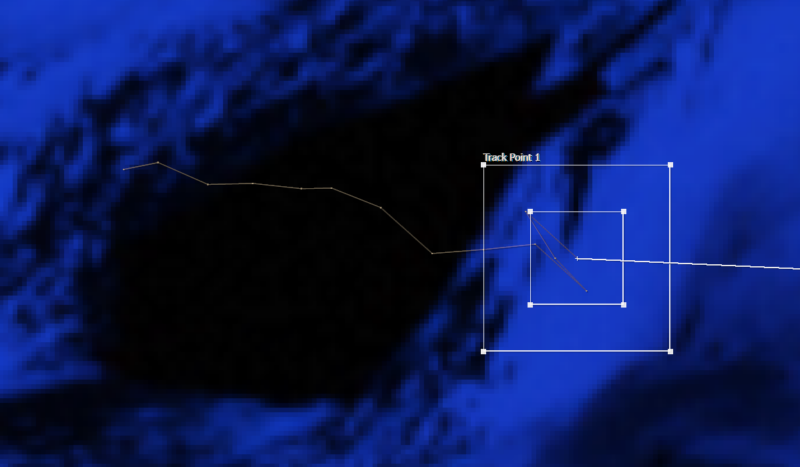
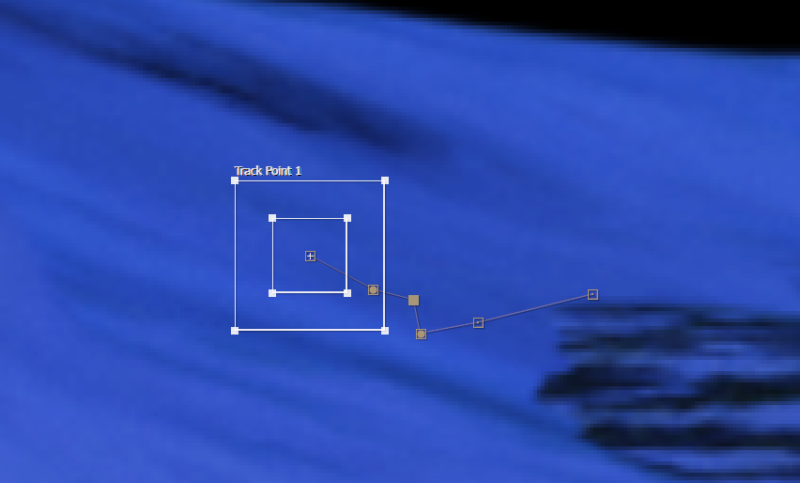
I’m doing simple Motion Tracking for Transformation keyframes. When the point I am tracking gets out of the frames, I select every Keyframes in the viewer and move them together to another point to continue the tracking. It usually works well enough, but since this morning, I am suddenly not able to select those keyframes, they just appear as a small line that I can’t move or select instead of box points that I can select and move around. I am attaching pictures of what I used to have in my viewer versus what I am having now.
I have the latest version of after effects (18.2). I tried every settings about motion path view options and even tried to reset all of my after effects settings.