Creative Communities of the World Forums

The peer to peer support community for media production professionals.

Activity Forums Adobe After Effects Expressions Access Comp’s Render Quality Settings C4D

  • Access Comp’s Render Quality Settings C4D

    Posted by Nils Hammers on July 12, 2024 at 11:58 am

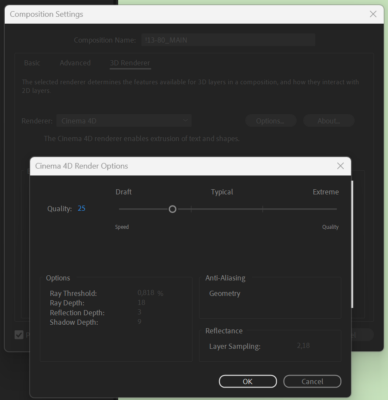
    Is there a way to access Quality settings value of the comp for the Cinema 4D renderer?

    I’d like to script the textLayer.sourceText with such an essential information as at what quality the scene is rendered, as the value is NOT impacted by the Render Settings in Queue, and is buried in UI – prone to be forgotten before hitting the Render button.

    Nils Hammers replied 1 year, 10 months ago 2 Members · 2 Replies
  • 2 Replies
  • Hector Vera

    July 15, 2024 at 4:10 pm

    Hello Nils! Good news is that there is a way that you can access the quality settings of the comp using the After Effects script API. Here is the following codes you can use to execute to see if it helps:

    // Get the current comp index

    var comp = app.project.activeDependency;

    // Get the current comp’s render settings

    var settings = comp.renderSettings;

    // Get the quality setting value

    var quality = settings.quality;

    console.log(“Quality: ” + quality);

    This code will log the current quality setting of the comp to the console. You can modify the code in any ways to suit your needs, such as retrieving the settings for specific render engines or including a prompt to ask the user which quality setting they want to use. Hope that it helps and let me know if you have any questions! 🙂

  • Nils Hammers

    July 17, 2024 at 10:42 am

    Hey Hector,
    Thank you for your input.
    What should I do in order to execute the script? I saved it as jsx and run from File>Scripts.. however it generates errors.
    Consulting the scripting manual AE Scripting Guide 22.3.0 docs
    , I failed to find such thing as activeDependecy, also quality attribute is listed for the layer objects only. Should I look elsewhere?
    It is a bit overwhelming, could you help more?

We use anonymous cookies to give you the best experience we can.
Our Privacy policy | GDPR Policy