Creative Communities of the World Forums

The peer to peer support community for media production professionals.

Activity Forums Apple Final Cut Pro 50fps to 25fps Conform or retime to FCP ?

  • 50fps to 25fps Conform or retime to FCP ?

    Posted by Thanos Papadopoulos on December 22, 2025 at 7:31 am

    Hi everybody, I have the footage at 50fps in order to make a 50% slow motion. Although when I drop the matiar in the timeline and change speed to 50% the motion is not smooth even if I choose optical flow.

    Is there a better way? If I click rate conform I see no difference but I might not follow the right steps.

    Ben Balser replied 5 months, 4 weeks ago 3 Members · 3 Replies
  • 3 Replies
  • Devrim Akteke

    December 22, 2025 at 10:53 am

    Hi,

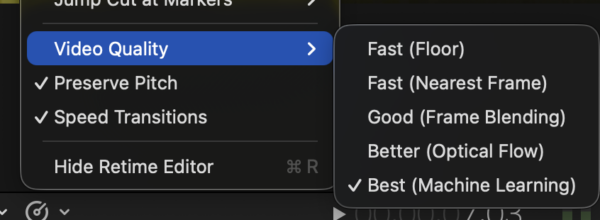
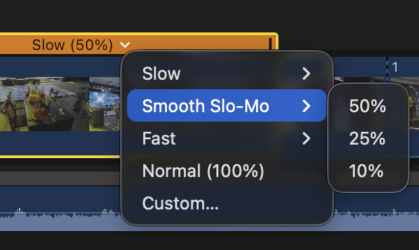
    Depending on your machine and version of FCP, do you see these options under the retime menus?

    If you can see these options, try them; if not, you should check the quality after rendering and setting the viewer at 100%

  • Thanos Papadopoulos

    December 22, 2025 at 1:22 pm

    I have fcp version 11.1 but what I would like to have as a result when I drop a shot of 50fps in a project of 25fps is to have the opposite effect of charlie chaplin movies 😀 I mean a slow motion, instead of that fcp removes half of the frames to create normal speed. I don’t want half of frames to be removed. I want a slow motion and double duration.

  • Ben Balser

    December 22, 2025 at 3:01 pm

    Drop your 50fps clip into a 25fps Timeline.

    Select the clip in the timeline.

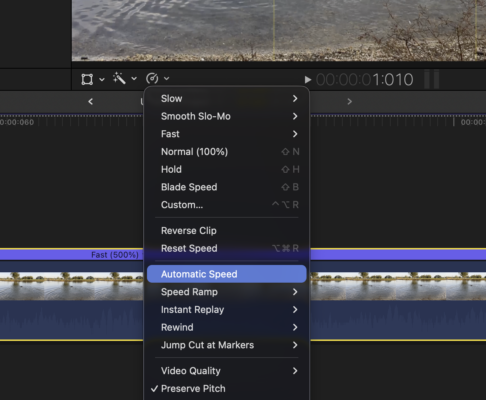
    Go to the Retime menu and select “Automatic Speed.”

    What this does is uses all original frames so nothing is dropped, nothing is artificially added. It just uses all the original frames and conforms them to the Timeline’s fps setting.

We use anonymous cookies to give you the best experience we can.
Our Privacy policy | GDPR Policy