

Activity › Forums › Apple Final Cut Pro › 1080 24p Advanced from Panasonic HVX200A
-
1080 24p Advanced from Panasonic HVX200A
Phil Snyder replied 5 years, 11 months ago 7 Members · 41 Replies
-

Jeremy Garchow
October 3, 2020 at 5:35 pm24pA is 29.97. Fcpx does not remove the pulldown when it wraps. Fcp7 does remove the pulldown on import. So what fcpx is showing you is right, it is rewrapping the op-atom MXF to 29.97 .mov
Have you tried dropping the 29.97 in a 23.98 Project yet?
Also, can you post the wetransfer link?
-

Phil Snyder
October 3, 2020 at 5:41 pmYes, I did, Jeremy. It doesn’t change the 29.97 clip when dropped in a 23.98 timeline.
Do you me to send you the original 24pA clip?
-

Joe Marler
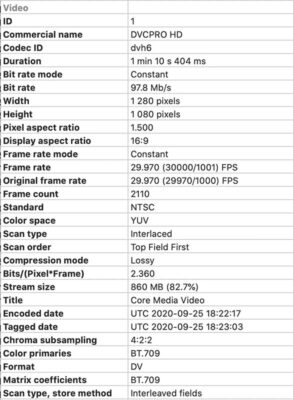
October 3, 2020 at 6:45 pmPhil, Jeremy is right. It apparently was originally shot at 24p but stored at 29.97 interlaced (59.94 fields/sec) using Panasonic’s “Advanced Pulldown” feature. Both FCPX and Resolve identify it as 29.97 fps interlaced because that’s what the metadata says. See below output from the Invisor metadata tool.
To make 24 fps fit within a 29.97 fps (what the HVX200 storage electronics supported) requires every fifth frame be duplicated. Unfortunately I’m not sure there was a standardized metadata system for identifying this. From the standpoint of FCPX and Resolve, it IS 29.97 interlaced.
There is a method of using the current version of Compressor to remove the advanced pulldown, which will produce a 23.98 fps progressive output file. To do this, import the file to Compressor, add an HD1080p preset, then under the Video tab at right, go to the bottom to Quality>Retiming Quality, and pick “Reverse Telecine”. Then export that file and it should produce a 23.98p result with the advanced pulldown removed, which you can then import to FCPX.

-
Jeremy Garchow
October 3, 2020 at 7:11 pmDo you me to send you the original 24pA clip?
Yes, Phil. Please send a clip.
You can send it here. It should be a clip that’s been imported directly, and not reexported.
https://www.dropbox.com/request/TjAabjIMAk6yNhJ2HnIY
-
Joe Marler
October 3, 2020 at 7:23 pmJeremy I uploaded a smaller, trimmed version of the camera file. I inspected the metadata to ensure it is identical to the original camera file.
-
Phil Snyder
October 3, 2020 at 9:52 pm“To do this, import the file to Compressor, add an HD1080p preset, then under the Video tab at right, go to the bottom to Quality>Retiming Quality, and pick “Reverse Telecine”. Then export that file and it should produce a 23.98p result with the advanced pulldown removed, which you can then import to FCPX.
Joe,
I was able to this with HD1080p setting which is a compressed h.264 but in Apple ProRes, the Reverse Telecine setting was grayed out.
-
Joe Marler
October 4, 2020 at 12:29 amPhil, re Reverse Telecine being greyed out if using PR422, I’ll examine that tomorrow. If you select RT first then change the codec, it accepts it but the exported file shows a cadence problem.
Reply to this Discussion! Login or Sign Up