

Defiance Learning Series – Announcing a brand new online, multi-session, hands-on video After Effects course!

Are you looking for that little “extra touch” in your video/film production to make your work stand out? Have you ever wanted to learn the secrets to making professional motion graphics in Adobe After Effects? Now’s your chance to learn from a highly-experienced motion design professional and After Effects user and trainer!
Whether you are just beginning or looking to unlock more secrets to this powerful software, this class has something for everyone, as it takes students through the process of understanding best-practices and strategic approaches to building their projects.
Don’t miss your chance to grow your creative brainpower!
Learn more and sign up below.
About the Course
This is a 15-session hands-on, instructional course designed to introduce beginners to the very basics, and more advanced users to concepts and approaches they may not know in Adobe After Effects. By the end of the course every student (from basic to advanced) should be able to understand, navigate and operate After Effects at (at least) an intermediate level. The goal of the course is to build a foundation of understanding of how the program works so that future learning comes easier…and with After Effects, learning new features, concepts and approaches is never-ending. My hope is that each student will be able to take what they learn and immediately apply it to their daily work-flow. After Effects is the right tool to bring professional looking motion graphics to your video or film production!
Ideal Students
Anyone who composites/edits on-air, on-line videos (packages, explainers, spots…), produces video or just wants to learn After Effects should consider taking this course. The ideal student understands good design (clean, consistent, visually pleasing layout), is a fairly experienced video editor and either knows some, or wants to learn Adobe After Effects.
Requirements
This course is very hands-on. Students are responsible for their own workstation or laptop (Mac or PC) with Adobe After
Effects, Premiere pro, Photoshop and Illustrator installed and up-to-date. The course will be conducted via live zoom
sessions. Students will need a reliable internet connection to attend. All course material (exercise files and content) will be
provided to students.
The Instructor
Jason Hirsch will be bringing 20+ years of After Effects knowledge and experience to the classroom. The course materials are designed to keep students challenged and engaged as together they complete exercises that result in a thorough project that they can refer back to as they continue learning beyond this class. Jason teaches with a logical, comprehensive style that helps students understand not just how to push buttons, but highlights how to get the most out of the program by leveraging its work-flow efficiencies.
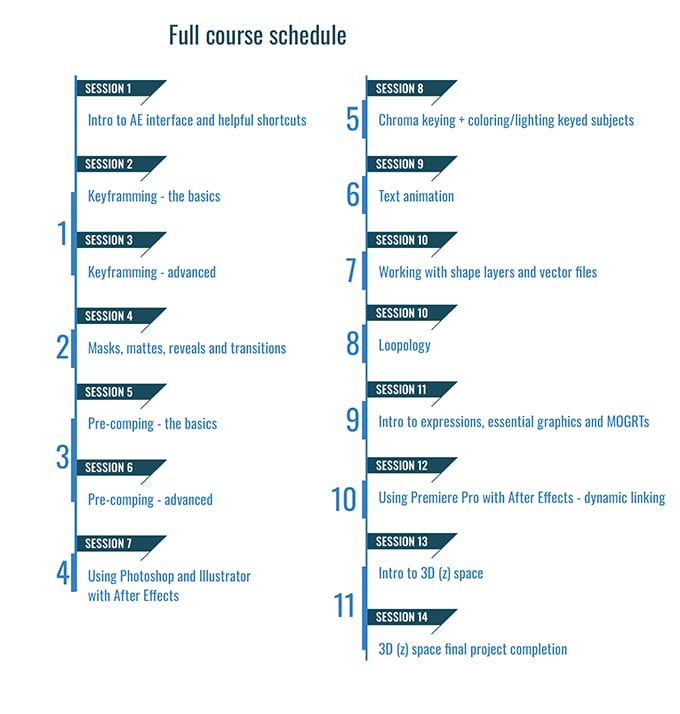
About the Sessions
There are 11 individual topics taught over 15 sessions. Each session is between 1 -2 hours. Sessions build off of one another, so it is beneficial to take entire course in order. Students will be building a personal project that will help them learn and also serve as a reference after class is complete. This course is designed to help students understand After Effects in a way that helps them continue to keep learning as the software advances. The course uses a fun, interactive approach that helps build a foundation of understanding motion design concepts through After Effects!
Pricing Structure and Registration
To register, go to
jasonhirschdesign.com/after-effects-course-1
Once payment is made, you will receive links to access purchased course or classes and all course material.
Full course price: $350
jasonhirschdesign.com
To register, go to:
jasonhirschdesign.com/after-effects-course-1
Once payment is made, you will receive links to access purchased course or classes and all course material.
Full course price includes
- Unlimited access to all 15 video sessions
- All course material
- Additional (take home) exercises
- Project support
- Up to 60 minutes of 1:1 instructor time
- Access to future single subject classes and/or content
Pricing Structure and Registration
Individual session price: $35 per session
Enjoying the news? Sign up for the Creative COW Newsletter!
Sign up for the Creative COW newsletter and get weekly updates on industry news, forum highlights, jobs, inspirational tutorials, tips, burning questions, and more! Receive bulletins from the largest, longest-running community dedicated to supporting professionals working in film, video, and audio.
Enter your email address, and your first and last name below!


Responses