Creative Communities of the World Forums

The peer to peer support community for media production professionals.

Activity Forums Apple Final Cut Pro Legacy Canon XF300 .MXF Workflow Error

  • Canon XF300 .MXF Workflow Error

    Posted by Vincent Ricafort on January 13, 2012 at 1:29 pm

    Hi everyone, first post here and I might be at my wit’s end. I shot over 60gb of footage using the Canon XF300. My settings were for broadcast television, cards initialized (X400 Transcend CF cards, which I have used previously), etc.

    After the shoot when I attempted to capture the footage I was prompted with the error:

    “‘AA4658’ contains unsupported media or has an invalid directory structure. Please choose a folder whose directory structure matches supported media.”
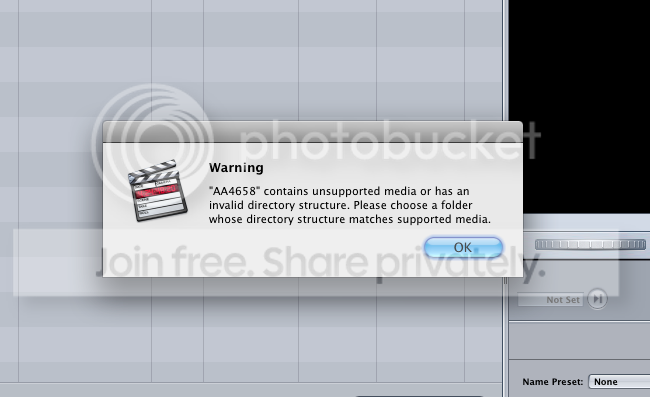
    The structure: “CONTENTS>CLIPS001”, etc.
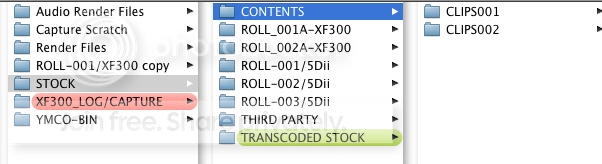
    I’ve tried log & transfer, log & capture, premier, streamclip; IMPORT>SONY XDCAM. Importing it through the XDCAM plugin nearly worked except my audio would slip out of sync.

    I don’t have a lot of clips, mainly uncut interview but everything on the XF300 was my primary camera and audio source. I’m fearing I might have to redo the production which is out of the question.

    Does anyone have any advice about this error or know of any option or know of any options to repair the directory/structure by importing it back to the camera?

    Jeff Nelson replied 9 years, 9 months ago 8 Members · 11 Replies
  • 11 Replies
  • Shane Ross

    January 13, 2012 at 4:02 pm

    You need to first download and install the Canon XF Log and Transfer plugin. Google it to find it. Then you use Log and Transfer to bring in the footage as ProRes

    Shane
    Little Frog Post
    Read my blog, Little Frog in High Def

  • Vincent Ricafort

    January 13, 2012 at 6:40 pm

    Thanks for the quick reply, Shane. The error has disappeared but the footage is still invisible to FCP 7. For some reason it is not recognized. Any ideas why this would be?

    live/love/learn

  • Shane Ross

    January 13, 2012 at 8:08 pm

    Sorry, wish I knew. Uhm…try trashing preferences? That solves a lot of issues.

    Shane
    Little Frog Post
    Read my blog, Little Frog in High Def

  • Jeff Meyer

    January 16, 2012 at 2:38 am

    While I don’t have any C300 footage, I do have XF footage and Adobe CS5.5. Same codec/card structure. If you go into the card (use a copy not your master, MacOS likes to write invisible ancillary files everywhere) and grab the MXF files you can throw them into Adobe Media Encoder and get a QT movie out. Make sure you build a preset that matches your source after adding the first clip so you don’t have to select it for every clip. This method isn’t as convient for logging, but timecode stays along for the ride.

    If you have CS5.5 (or probably CS5) this could be a solution, with the only expense being some labor.

  • Michael Smith

    June 15, 2012 at 10:43 am

    Hi,

    I just had the same problem while doing what Vincent was doing.

    Thanks to a phone call, I found the solution, after installing the files form the canon website, the person I talked to said, to drag and drop the folder with the files in, into the log and transfer window, and that did it.

    I realise some time has passed between now and the original post, thought I’d share it.

  • Rafael Amador

    December 26, 2012 at 9:49 am

    Please stop misleading people and giving wrong advice to sell your software. That’s not allowed in The COW.
    Canon FX Plugin for FCPX (Lion and Mountain Lion) can be found on this link:
    https://www.learn.usa.canon.com/resources/blogs/2012/20120224_xf_plugin_fcp_x.shtml
    rafael

    http://www.nagavideo.com

  • White Yufeng

    March 18, 2013 at 8:58 am

    You should free download the Canon XF Utility 1.3.1 for Mac OS X. After Install the plugin, please back up MXF footages with XF Utility. And then import the footages to Log and Transfer window from XF Utility.

    Tip: Before backing up videos, please make sure you have set the location to store your footage in the Preferences menu.

    LEARN MORE: Two ways to ingest Canon XF305 MXF recordings to Final Cut Pro 7

    ———————————————–

    Camcorder Video Tips

  • Zak Johnson

    October 15, 2014 at 3:20 am

    I had the same issue. Found the support plugin here:

    https://usa.canon.com/cusa/professional/products/professional_cameras/cinema_eos_cameras/eos_c300?selectedName=DriversAndSoftware

    After I installed, the error message went away and I was able to log and transfer C300 footage.

  • Jeff Nelson

    July 27, 2016 at 2:17 am

    Help – I shot on my C300 and cannot get footage off the card. I can see the files on the card. I can put in another card and my Log and Transfer works fine for footage on that card. But on one card, I can see the mxf files are there, but have no way to get them into FCP 7.

    Any suggestions? I have Canon XF utility installed, but can’t see any way to get the footage off. Thanks.

  • Shane Ross

    July 27, 2016 at 3:03 am

    Try EditReady by Divergentmedia.com. And even try Resolve. Wonder if the card is damaged. Can you manually copy the files off? That’s the first step, anyway…backup. Don’t L&T directly from the card, back up the card and L&T from that.

    Shane
    Little Frog Post
    Read my blog, Little Frog in High Def

Page 1 of 2

We use anonymous cookies to give you the best experience we can.
Our Privacy policy | GDPR Policy