-
Fake 3D Shape layers with “perspective”
Hello All,
I am animating some text made of shape layers and I am using the repeater trick to create a fake chunky Extrusion effect.
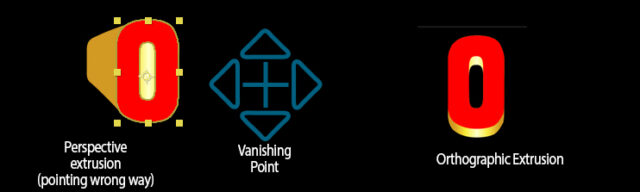
I’ve tried to be a bit (too) clever and rigged up a slider so that I can animate between each repeater’s own anchor point location, and the anchor point of a Null at the center of the comp- the idea being that I can then blend between a fixed vanishing point “perspective” effect for all characters and the more typical orthographic look where the extrusion is simply offset downwards.The following expression is applied to the repeater position:
A= [value[0], value[1]];
target = effect(“Position Offsetter”)(“Layer”);
B= target.toComp(target.anchorPoint);
S= effect(“Chunk Perspective”)(“Slider”);
linear(S, 0, 100, A, B);I have a layer expression effect to select the target (so that I don’t have to keep editing the expression on each character), and a Chunk Perspective slider to blend between the two points (this also controls the repeater scale).
The trouble I am having is that the “perspective extrusion” doesn’t point towards the specified vanishing point as intended. It doesn’t always point away from it either, which makes it hard to determine what the missing factor is. I’ve tried various permutations such as subtracting the vanishing point position from the layer position but I can’t seem to get a consistent result that indicates what the problem might be. It gets even more confusing when you consider that the shape group has it’s own transforms and anchor point, as well as the repeater and the layer itself, which no doubt plays into it in some insidious way.
Does anyone have an idea what the problem might be…?Thanks,
PB