Creative Communities of the World Forums

The peer to peer support community for media production professionals.

Activity Forums Maxon Cinema 4D What are these black dots in some frames? what setting I need to change to avoid

  • What are these black dots in some frames? what setting I need to change to avoid

    Posted by Andy Corleone on October 7, 2023 at 4:18 pm

    What are these black dots in some frames? what setting I need to change to avoid them?

    about 7 frames out of 240, Using Cinema 4D Phisical Render with Ambient Occlusion and GI on. When I Re-Render Usually doesn’t show again but not sure how to solve it in the future.


    Kouraib Abdmalek
    replied 2 years, 7 months ago
    2 Members · 4 Replies
  • 4 Replies
  • Kouraib Abdmalek

    October 8, 2023 at 8:45 am

    Hi Andy,

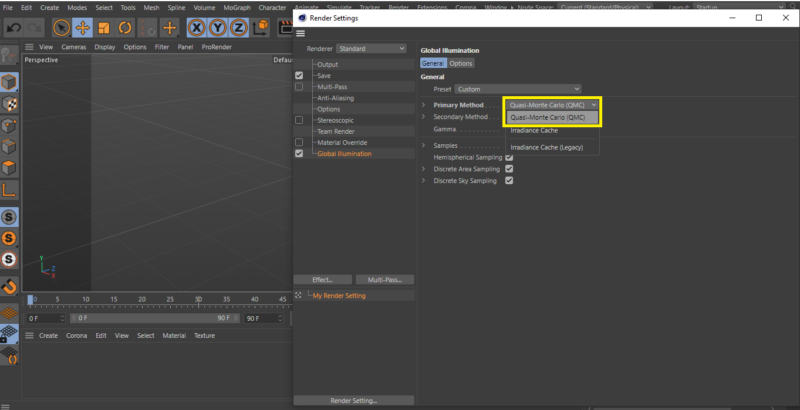
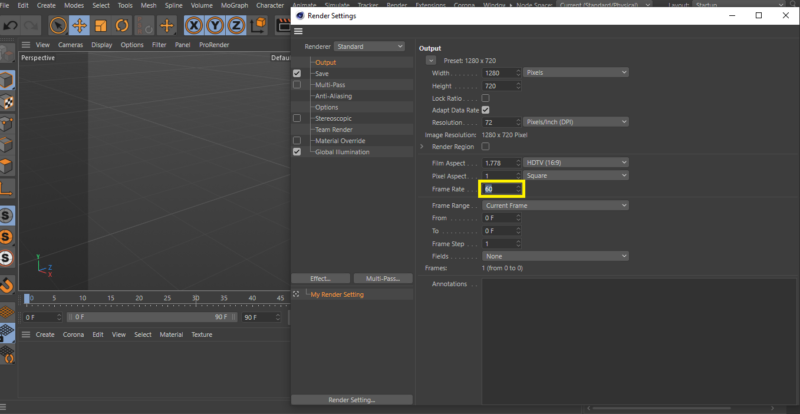
    you could try to change the primary method in GI to QMC and increase the FPS in the output to 60 like in the screenshots below, I think that will solve the problem

    hope that will help you

  • Kouraib Abdmalek

    October 8, 2023 at 10:11 am

    Also if you think that the lights getting hotter in your scene, try bringing the light intensity down or the samples up.

  • Andy Corleone

    October 8, 2023 at 12:52 pm

    thanks so much I will try and see, So do you think this is an over expoxed issue? cheers

  • Kouraib Abdmalek

    October 9, 2023 at 8:34 am

    You are welcome! I’m happy to help you, this an example from someone else who had the same problem and was solved by bringing the samples up.

    Thanks!

We use anonymous cookies to give you the best experience we can.
Our Privacy policy | GDPR Policy