Creative Communities of the World Forums

The peer to peer support community for media production professionals.

Activity › Forums › Maxon Cinema 4D › The Colors are Correct in the Reflections not on the Object

Tagged: 

  • The Colors are Correct in the Reflections not on the Object

    Posted by Sean Lloyd on December 8, 2022 at 4:33 am

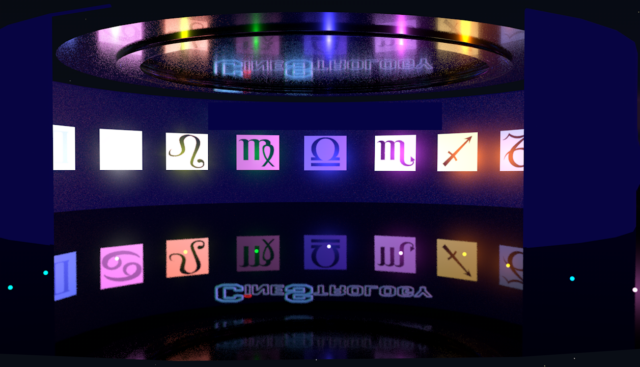
    This is a weird one. All the colors read correctly in the reflections not on the set I made. Some in the middle are but the rest are wrong. Each panel is backlit by a colored light. I don’t get it.

    Any ideas? I’m almost finished but this problem is blocking me from finishing it.

    Sean Lloyd replied 3 years, 8 months ago 2 Members · 5 Replies
  • 5 Replies
  • Michael blaq

    December 9, 2022 at 1:24 pm

    Are you rendering with Element 3D or is this a Cinema 4D rendered sequence?

  • Sean Lloyd

    December 9, 2022 at 8:02 pm

    It’s rendered in C4D with the physical setting.

    And thanks very much for the reply. I’ll look up what Element 3d is because I have never used it.

  • Michael blaq

    December 11, 2022 at 10:41 pm

    Is it possible for you to share a scene file and a sample of what you are trying to achieve with me?

  • Sean Lloyd

    December 11, 2022 at 11:00 pm

    What I’m trying to achieve is what is in the photo. I just need the colors to show up correctly.

  • Sean Lloyd

    January 26, 2023 at 7:41 am

    Just wanted to update. I finally figured out what may be obvious to many. My problem was in the render settings. I didn’t have COLOR MAPPING checked in my render. Once I changed it it fixed my problem.

We use anonymous cookies to give you the best experience we can.
Our Privacy policy | GDPR Policy