

Activity › Forums › Adobe After Effects Expressions › Connecting movements inside of a mask to a slider
-
Connecting movements inside of a mask to a slider
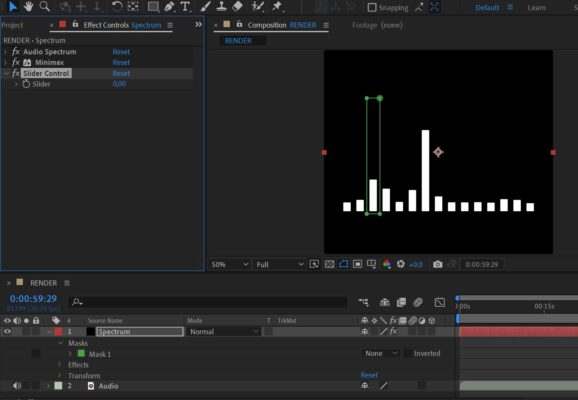
Posted by Kamiar Babaei on May 1, 2021 at 1:32 amIs it possible?
PS:I know you can do this using red giants plugin or make anything react to music using convert Music to keyframes option.
 Dan Ebberts replied 5 years, 4 months ago 2 Members · 4 Replies
 -
4 Replies
-

Dan Ebberts
May 1, 2021 at 10:44 pmYou could set up an expression for your mask path, where the height is based on the slider value. This example is more complicated than it needs to be, because I wasn’t sure whether your path goes clockwise or counter-clockwise so the expression allows for either:
s = effect("Slider Control")("Slider");
p = thisProperty.points();
if (p[1][0] < p[3][0]){
p0 = p[3] - [0,s];
p1 = p[2] - [0,s];
newP = [p0,p1,p[2],p[3]];
}else{
p0 = p[1] - [0,s];
p3 = p[2] - [0,s];
newP = [p0,p[1],p[2],p3];
}
createPath(newP,[],[],true)
-

Kamiar Babaei
May 2, 2021 at 9:38 amThank you so much for this awesome expression.
But what i meant was the white bar inside of the mask is going to move vertically and i need the slider to acknowledge it and set a value to it between 0-100 based of the size of the mask.
is it possible?
thank you so much and sorry for not explaining properly what i wanted at first, i didn’t how to say it.
-
Dan Ebberts
May 3, 2021 at 10:09 pmThe only thing I can think of would be to use sampleImage() (with postEffect=true) in a loop, starting at the top of the range and moving down (1 pixel at a time) until you find a pixel with non-zero alpha to determine the current height of that bar. Then use that value to drive the height of the mask.
Reply to this Discussion! Login or Sign Up