

Activity › Forums › Adobe After Effects › Needing some pro advice
-
Needing some pro advice
Posted by Lisa Simonson on September 28, 2011 at 7:55 pmI’ve run into a snag with this shot.
Explosion reflection in goggles with slow dolly into C.U., one lens.
I’ve tried alpha mask w add blending mode , color key, track mats, gradient mask,lots of things, yet every time I render the explosion seems to float on top. Not natural looking, The explosions are alpha channels. Any tips or ideas? Is it OK to post a still?Sean Mullen replied 14 years, 12 months ago 3 Members · 7 Replies -
7 Replies
-

Ben G unguren
September 28, 2011 at 8:12 pmIs this a compositing problem, or it is a movement problem, or both?
If it’s compositing, posting a still will be very helpful.Ben Unguren
Motion Graphics & Editing
http://www.mostlydocumentary.comSome contents or functionalities here are not available due to your cookie preferences!This happens because the functionality/content marked as “Vimeo framework” uses cookies that you choosed to keep disabled. In order to view this content or use this functionality, please enable cookies: click here to open your cookie preferences.
-

Sean Mullen
September 28, 2011 at 8:19 pmHave you tried blending the bg of the goggles back over the explosion element? You could also track in a light reflection over the explosion as well. Like Ben said, it would be easier to identify with a still or clip.
Sean Mullen
Rampant Design Tools -

Lisa Simonson
September 28, 2011 at 8:31 pmThanks!
Here is a mock up I did in photoshop.
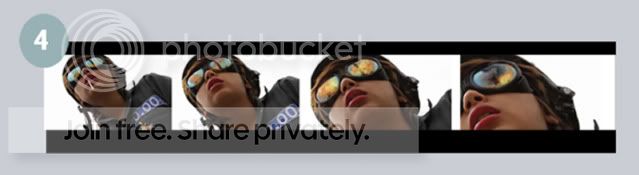
The mask isn’t that difficult. Unfortunately there is a slight curve with the dolly in. When I animate the mask its really aweful. Like a bad rotoscoping job.
-
Sean Mullen
September 28, 2011 at 8:37 pmOk I see. I’d recommend feathering your mattes and if you are hand tracking them, to do at least every 3-5 frames (if not every frame, depending on the move) I’d also lower the opacity of the reflection a bit, blending in the goggles more. Try also putting a slight blur on the elements you are compositing.
Sean Mullen
Rampant Design Tools -
Lisa Simonson
September 28, 2011 at 8:44 pmOh! So hand tracking should be more frequent it seems. I was hand tracking about every 15-20 frames. Probably why it looked so jumbled. Will lower the opacity and use slight blur.
great, thanks!
-
Ben G unguren
September 28, 2011 at 9:31 pmA mocha track wouldn’t take long and might make a big difference over hand tracking. Then again, hand tracking has a certain appeal to it as well. But if the child is making any kind of small movements, the hand tracking tends to miss it.
Ben Unguren
Motion Graphics & Editing
http://www.mostlydocumentary.comSome contents or functionalities here are not available due to your cookie preferences!This happens because the functionality/content marked as “Vimeo framework” uses cookies that you choosed to keep disabled. In order to view this content or use this functionality, please enable cookies: click here to open your cookie preferences.
-
Sean Mullen
September 28, 2011 at 9:33 pmI agree completely, I rarely hand track. It’s easier to remove keyframes from a Mocha track for a looser feel than it is to refine a hand track, in my opinion. Mocha should be able to attack this fairly easily.
Sean Mullen
Rampant Design Tools
Reply to this Discussion! Login or Sign Up