Creative Communities of the World Forums

The peer to peer support community for media production professionals.

Activity Forums Adobe After Effects After Effects ONLY USES 1 CORE for on fly render

  • After Effects ONLY USES 1 CORE for on fly render

    Posted by James Osbun on November 3, 2013 at 8:12 am

    Hi CC community.

    I have a pretty solid computer but am very disappointed with how slow frame updates can be in After Effects. I am quite familiar with how to set up AE for RAM/CPU distribution, but maybe I’ve clicked something that is causing this issue.

    My system has 24 cores and 64 gb of RAM. I utilize 4GB per core, allowing for 8 AE cores. Also have CUDA enable for a gtx580 3GB. The OS is Mac 10.8.5 with AE Creative Cloud, fully updated along with the NVidia drivers.

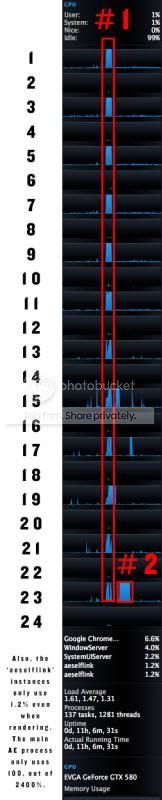
    I’m attaching an image that shows 12 of my 24 cores jumping to action during a frame render, then one single core finishes the render very slowly.

    Another point worth mentioning is that I am rendering a frame for a map animation that uses a 20K jpg that is 10.7MB in size. There are a few images like this overlaying one another. The 10.7MB size is actually quite small given the resolution, but perhaps it is an issue… although I don’t know how that relates to AE simply not using the immense power at its disposal.

    Thanks in advance.

    Quick info on the image:
    #1 = what happened the first 10 seconds after moving to a new frame in the timeline
    #2 = another 30 seconds on one core only
    Producer, Vice President (Monarex)
    Film with Sony F3, Canon XF300 & 5D MKii (Zeiss glass, by Duclos)
    Finish with 3 Hackintosh Edit Bays (by Cy)

    James Osbun replied 12 years, 8 months ago 6 Members · 15 Replies
  • 15 Replies
  • James Osbun

    November 4, 2013 at 4:17 am

    Hi Dave,

    Thanks. I’ve tried the same project file with the card disabled. No difference.

    I am using the CLASSIC 3D renderer, which really doesn’t utilize the card that way. Within the Raytraced 3D renderer though, that gtx580 is very powerful and renders the same frame (that takes Classic 3D 30 seconds) in less than 3 seconds.

    The problem is not related to me asking AE to use too many cores either. As I mentioned in my first post, I’ve only allotted 8 out of my 24 cores to AE and given each of those 8 PHYSICAL cores 4 GBs of RAM.

    I’m still stuck wondering why all my CPU power is going to waste within the program. Perhaps its worth mentioning that when I render (especially using the Background Renderer script) all 24 cores are utilized and frames are rendered so much faster than when I am still working in my comp.

    Anybody shed light on this??

    Thanks!

  • Ridley Walker

    November 4, 2013 at 6:59 am

    [James Osbun] “Anybody shed light on this?? “

    In my experience, multi-core renders only benefit certain types of renders. Some renders are computationally expensive others are more disk-bound and are bound by data transfer speeds, ie reads and writes from the source drives to the render drive.

    From the description you provide about 20k images and JPEGs it would seem that the graphics buffer might fill trying to load 20,000 pixels and composite that with another 20,000 pixels. Since JPEGs are compressed they still need to be de-compressed to be read and composited.

    My guess is that your test Comp is disk bound and not processor bound – which might explain why After Effects is only using 1 processor, this particular render won’t benefit from more, its not computation that’s slowing it down.

    What’s happening with RAM during this render?

  • Paul Roper

    November 4, 2013 at 9:07 am

    …and to continue on Ridley’s post, could you try converting the JPEG to an uncompressed format, such as a native Photoshop document or an uncompressed TIFF and replacing it in the AE project? That way, AE wouldn’t have to load the image from disk and decompress it for each frame. Maybe it only does this once and stores the decompressed image – I’m not sure.

    Maybe you just don’t have enough RAM per processor – AE must decompress whatever image you have, and according to Photoshop, a 20,000 x 20,000 pixel RGB image is 1.12GB. I don’t know how AE’s memory internals work, but I wouldn’t be surprised if it would need 1.12GB to store the original image, another 1.12GB to process the frame, and another 1.12GB to store the finished frame. Working with that size image, I’d be tempted to set the memory per processor up to 6GB…or turn multiprocessing off.

    – Paul

  • James Osbun

    November 4, 2013 at 7:47 pm

    Hi Ridley,

    RAM use went from 2.95GB to 5.4GB utilization during a frame render. One core was active at 100% for 40 seconds until the frame rendered. I have allotted 4GB of RAM per core, so that use is within those parameters.

    I am going to try and test your jpg theory, however I must admit I am not entirely sure how to guarantee that AE wont have to decompress the images… As Paul mentioned, would it work to simple create a .psd? I have a meeting to head to but later this afternoon I will try and report back with the result. Any additional thoughts in the meantime a VERY appreciated.

    Thanks to everyone who is pitching in on this; its really been eating at my soul to work so slowly. 😀
    -James

  • James Osbun

    November 4, 2013 at 7:54 pm

    Thanks Paul. As I mentioned I will try some more adjustments this afternoon; one being a .psd file with the 20k images.

    I just now disabled Multiprocessing and rendered a frame. Same situation as before though. One CPU at a time handled the render over 40 seconds.

    It would be nice to know how AE handles compression within its memory/disk cache operations. I’ve also posted to Adobe forums, so if anyone over there has an answer I’ll be sure to update here.

  • James Osbun

    November 5, 2013 at 12:14 am

    I have done a few things this afternoon to test ways to speed the render time:

    #1: I swapped .psd files in for the .jpg files and when I rendered, the time was pretty much the same. Negligible difference.

    #2: I removed a Trapcode Particular layer and the render was very fast. 3 seconds. Obviously, the 30-40 additional seconds of calculation are caused by this…. I then put it back in and lowered the particle amount by quite a large portion and the render dropped down to 12 seconds, which is far better, but I am still very confused as to why Trapcode only uses one core to run a calculation.

  • Jim Arco

    November 5, 2013 at 12:28 am

    SOME plug-in have been designed to only work in one cpu; the thinking is that a render-farm would need a licen$e for each cpu.

    You may want to ask Trapcode if that is the case for Particular.

    Jim

  • James Osbun

    November 5, 2013 at 12:48 am

    Hi Jim, I thought the same thing, but:

    “Faster rendering in Version 2
    The new version can render hundreds of thousands of particles per second by taking advantage of multi-core processors. The new 3D renderer delivers full shading of particles, and yet the engine can be up to twice as fast as previous versions.”

    It is supposed to utilize multiple cores without issue.

  • James Osbun

    November 5, 2013 at 5:10 am

    HI ALL:

    So after a day of ‘foruming’ regarding AE not using the resources my computer offers it, the following is the result:

    Todd Kopriva over on Adobe’s Forum says:

    “There’s no further insight to give, other than perhaps to tell you that we currently have a large fraction of our team working on making all of After Effects behave better (i.e., faster) in this area.

    No promises, but we’re hoping to have something to show next year.”

    In short, Adobe is aware of this issue and is working to fix it. While I am super happy to hear that, I must add that it confuses me that the BG Renderer Script https://aescripts.com/bg-renderer/ for less than $40 is capable of utilizing 100% of my machine and AE is more often than not, lucky to break 50% on a render and 10% when working in-comp.

    Anyway, let’s wish Adobe the best and pray for sooner rather than later, b/c sitting at a computer for longer than necessary is just unnecessary.

  • Chris Brett

    November 5, 2013 at 2:16 pm

    Hi James

    Excellent thread — lots a people will be very interested in this I think.

    Wpuld however appreciate clarification on a few details please ,,,,

    …… are you saying that if you use the bg renderer script AE renders comps at twice the speed ? !!!

    —– and if so is this a ‘definate’ please ?– ie has this been well enough scrutinised to be taken as a fact?

    ——- chris brett

Page 1 of 2

We use anonymous cookies to give you the best experience we can.
Our Privacy policy | GDPR Policy
