

-
Color of photo depends on importing (or not) …another photo… Weird.
Hi!
This is a screenshot:
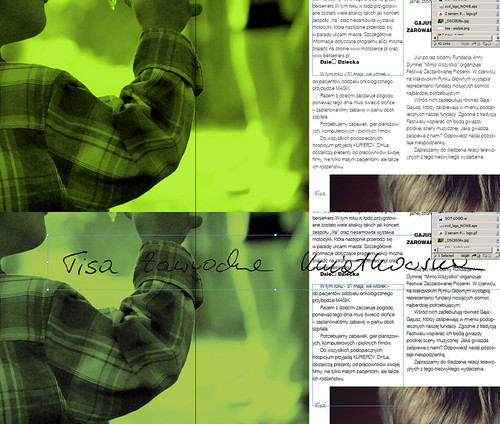
Upper part shows composition on the start. And lower part shows what happens when I place in that page a new object – TIFF file with transparency (this black signature). The green color of the photo on the left changes, fades a bit.
When I import regular jpg without transparency – everything is OK.
And one more thing: please notice part of the photo with hairs on the bottom right – it doesn’t change the color!! (It doesn’t matter that the signature is not overlaping the hairy photo – I’ve checked that too)
I’ve checked those two files files (the green one and those hairs) – their properties seems to be identical:
- there’s no color profile embedded
- both 8 bit
- both RGB
What elce can I check to solve this problem. Or maybe it’s only VIEW of that colors, and they will be the same when printed?
Please help if you know what to do.
Thx.PS: (Indesign CS5)
LAPTOP: Sony Vaio VPCF11S1E: Intel Core i7 (1.6 GHz) | 6GB RAM | GeForce GT 330M | Win7 x64 Home |
DESKTOP: Intel Core 2 Duo E6600 | Asus P5B Deluxe | 4GB RAM | GeForce7200 | Windows XP Pro SP3

