

Activity › Forums › Adobe After Effects › Apply LUT effect
-
Apply LUT effect
Posted by Jim Bachalo on July 1, 2011 at 9:57 amThe documentation for apply LUT effect is pretty limited.
I was wondering if there were any AE compatible LUTs available for download I might be able to use for color grading.Local is the new global
Walter Soyka replied 15 years ago 3 Members · 6 Replies -
6 Replies
-

Walter Soyka
July 1, 2011 at 12:43 pm[jim bachalo] “I was wondering if there were any AE compatible LUTs available for download I might be able to use for color grading.”
LUTs are usually used to communicate color grades from one system to another (for example, a colorist could send a LUT to a compositor).
Some systems use LUTs for color management, but the After Effects color management system is built around ICC profiles — a far more flexible and elegant system, in my opinion.
What exactly is it that you want to do with LUTs?
Walter Soyka
Principal & Designer at Keen Live
Motion Graphics, Widescreen Events, Presentation Design, and Consulting
RenderBreak Blog – What I’m thinking when my workstation’s thinking
Creative Cow Forum Host: Live & Stage Events -

Jim Bachalo
July 1, 2011 at 1:55 pmWas under the impression that you could use LUTs for color curve presets, to save certain looks.
There are certain looks I am trying to match using curves but having a difficult time.
Local is the new global
-
Walter Soyka
July 1, 2011 at 2:17 pm[jim bachalo] “Was under the impression that you could use LUTs for color curve presets, to save certain looks.”
You absolutely can — with the proviso that a LUT is limited to translating one table of colors directly to another — but I don’t know of anyone sharing LUTs online as artistic presets. (Of course, that doesn’t necessarily mean they’re not out there.)
Again, though, I think LUTs are mainly used as technical, system-specific tools for working with particular cameras, displays, or film stocks.
If you want to save a LUT from AE, check out Red Giant Software’s free LUT Buddy [link].
[jim bachalo] “There are certain looks I am trying to match using curves but having a difficult time.”
Curves may not be the best tool for the job — can you post some stills showing the look you’re going for, and the footage you’re working with? Maybe we can help.
Walter Soyka
Principal & Designer at Keen Live
Motion Graphics, Widescreen Events, Presentation Design, and Consulting
RenderBreak Blog – What I’m thinking when my workstation’s thinking
Creative Cow Forum Host: Live & Stage Events -

Michael Szalapski
July 1, 2011 at 2:34 pmYou could set up a preset for the look you want.
Now, the problem comes if the underlying footage varies. This (old) tutorial [link] may help.
– The Great Szalam
(The ‘Great’ stands for ‘Not So Great, in fact, Extremely Humble’)No trees were harmed in the creation of this message, but several thousand electrons were mildly inconvenienced.
-
Jim Bachalo
July 1, 2011 at 11:56 pmThanks Walter.
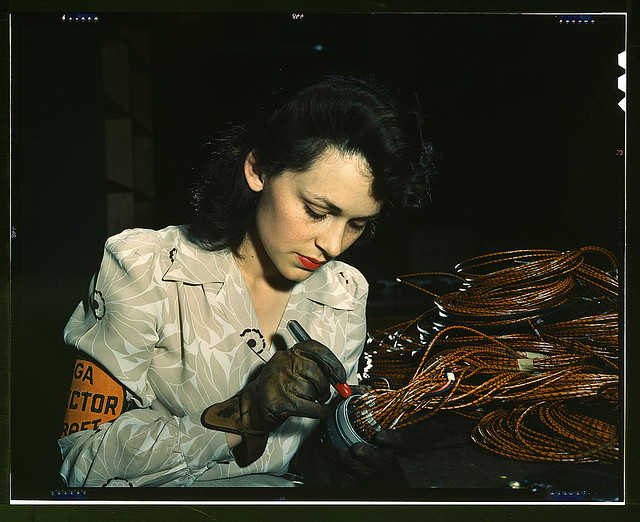
LOTS of looks I’d like to be able to match using only curves.Here are 3 that spring to mind!
1-old Kodachrome from Library of Congress (I tried all the film presets in Color Finesse but none come even close)
https://www.flickr.com/photos/library_of_congress/sets/72157603671370361/
here’s 1 favorite
https://www.flickr.com/photos/library_of_congress/2178345695/in/set-72157603671370361besides the obvious crushed blacks, not sure how to best approach this using curves.
love the look of a few of these Canon picture style presets
here’s 2 I really like
2-WEDDING
https://www.flickr.com/photos/kevin32832/4976572653/in/set-72157624924507322/3-LOMO
https://www.flickr.com/photos/kevin32832/5097430548/in/set-72157625199074416/I’m pretty sure its possible to approximate these looks using RGB curves only, but I could be wrong.
Perhaps in conjunction with another effect or setting in Color Finesse?Local is the new global
-
Walter Soyka
July 5, 2011 at 1:52 pm[jim bachalo] “I’m pretty sure its possible to approximate these looks using RGB curves only, but I could be wrong. Perhaps in conjunction with another effect or setting in Color Finesse?”
Why limit yourself to Curves in Color Finesse? I think the HSL controls are quite a bit more approachable for manipulating hue, and the CMY controls might be worth looking into for emulating older film stocks.
I think that these looks will be next to impossible to achieve with primary color correction alone — secondaries will make this a lot easier.
Walter Soyka
Principal & Designer at Keen Live
Motion Graphics, Widescreen Events, Presentation Design, and Consulting
RenderBreak Blog – What I’m thinking when my workstation’s thinking
Creative Cow Forum Host: Live & Stage Events
Reply to this Discussion! Login or Sign Up