


What’s New in Adobe Premiere Pro October 2022 release, version 23.0

Built for editors and designed for creativity, the 23.0 release of Premiere Pro presents the best titling toolset available. Streamline your title and graphics workflows with refinements such as the ability to bulk edit title clips in the timeline, flexible alignment controls, and more. The release incorporates foundational work on stability and performance, like faster Motion Graphics templates and GPU-accelerated Lumetri scopes. With support for the new ARRI ALEXA 35 and AAF on Apple silicon, interoperability and format support is expanded.
Operating system requirements have been updated. As of this release, Premiere Pro no longer includes Legacy Titler.

Titling refinements
Inner and outer strokes for graphics
Use the titling and graphics tools in Premiere Pro to add visual impact and production value to your videos.
Select between inner, centered, or outer strokes for more control when adding decorative elements to text and graphics in Premiere Pro.

Flexible alignment controls
Designing titles in Premiere Pro is easier and faster. Line up text and shape elements with one click when designing titles in the Premiere Pro Program Monitor. Along with the ability to align objects in relation to each other, you can now also align text and shape elements with the video frame.
Bulk edit titles on the timeline
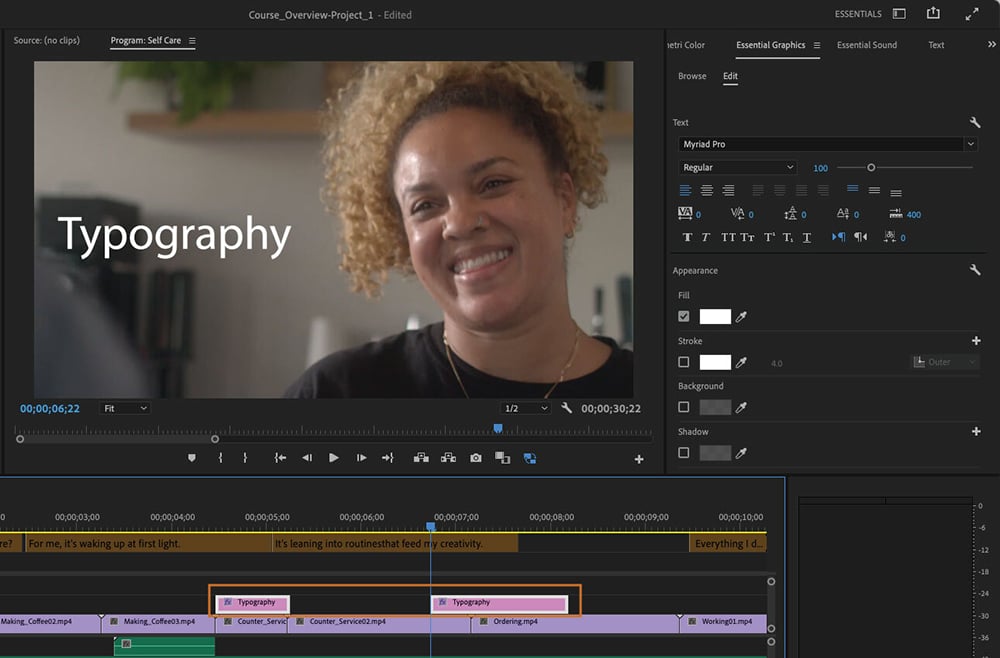
Working with titles is more efficient and flexible. Select multiple title clips in the sequence and apply changes like font or font size, colors, and backgrounds to all of them simultaneously.
Performance improvements
2x Faster Motion Graphics templates
Motion Graphics templates from After Effects now render 2x faster in Premiere Pro thanks to Multi-Frame Rendering. Depending on the template and your system you may see even more significant speed gains.
Improved performance for AVC Intra
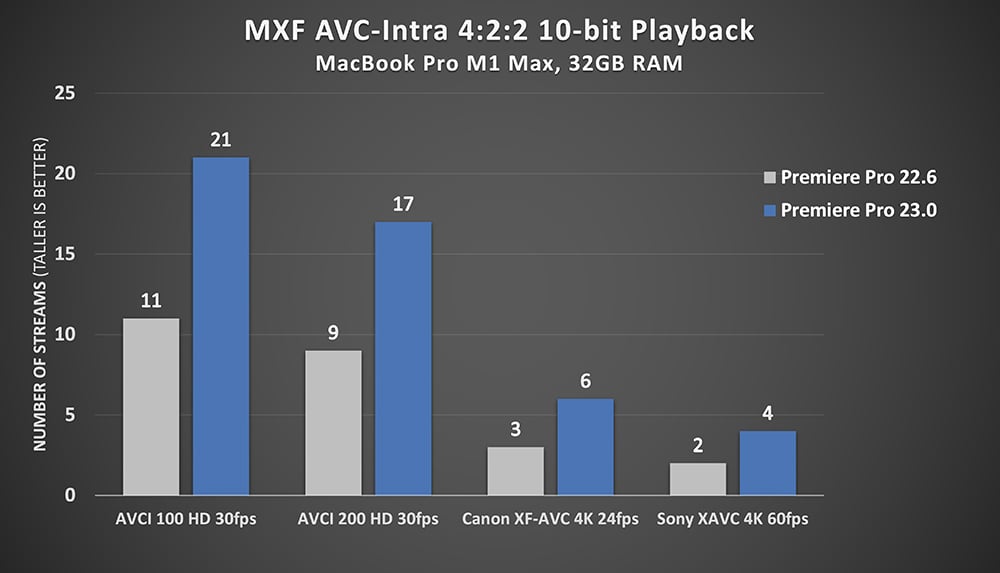
10-bit AVC Intra formats are now up to 2x faster on Apple silicon, thanks to GPU acceleration, providing improved playback and smoother scrubbing performance for AVC Intra formats in MXF containers, including Sony XA VC Intra, Canon XF-AVC Intra, and Panasonic AVC Intra.
GPU acceleration for Lumetri scopes
GPU acceleration for Lumetri scopes makes better use of system resources, resulting in better playback.
Improved Previews on Windows and macOS
Premiere Pro now uses Apple ProRes 422 LT as the default codec for sequence rendering, which provides highquality previews for rendered effects on macOS and Windows.
Interoperability and format support
AAF support for Apple silicon
AAF support extends interoperability for Premiere Pro users working on Apple silicon Macs. Previously, this functionality was only available in Premiere Pro in Rosetta mode.\
ARRI ALEXA 35 camera support
ARRI RAW and ProRes files from the ARRI ALEXA 35 camera are now supported.
###
Enjoying the news? Sign up for the Creative COW Newsletter!
Sign up for the Creative COW newsletter and get weekly updates on industry news, forum highlights, jobs, inspirational tutorials, tips, burning questions, and more! Receive bulletins from the largest, longest-running community dedicated to supporting professionals working in film, video, and audio.
Enter your email address, a first and last name, and let us know what you’d like to see more of in the message!

Responses