Forum Replies Created

Page 3 of 13
  • Hey Joshua!

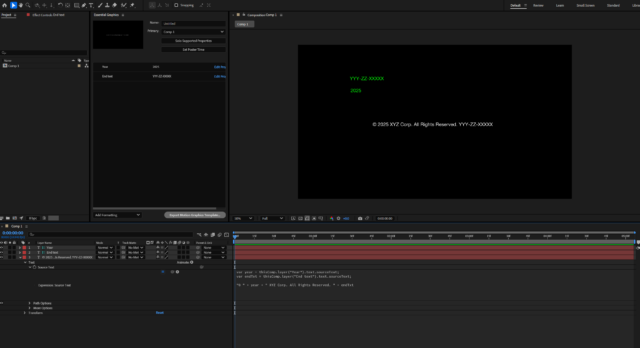
    If you’re looking for an easier solution, here’s what I usually do (see the screenshot as well):

    I create invisible text layers that are included in the Essential Graphics panel for editors to modify. These text layers are then assembled and linked to the main visible text layers. Here’s what the expression looks like:

    var year = thisComp.layer("Year").text.sourceText; //linking the text layer for the year
    var endTxt = thisComp.layer("End text").text.sourceText; //linking the text layer for the end part
    "© " + year + " XYZ Corp. All Rights Reserved. " + endTxt //assembling everything together

    in this case, I have a text layer for the year and one for the ending like in your case. so that way, the year can also be adjusted.


    Let me know if you got any questions !


  • Yoan Boisjoli

    February 26, 2025 at 8:42 pm in reply to: New AE v25 Text Expression methods …

    I just tried setLeftMargin(value) and made it work by linking a slider to it. The margin suddenly was animated when adjusting the slider’s value. Here’s the code I used:

    marginValue = effect("Slider Control")(1).value;
    text.sourceText.style.setLeftMargin(marginValue);
  • Yoan Boisjoli

    February 26, 2025 at 3:55 pm in reply to: New AE v25 Text Expression methods …

    That’s very cool Roland!

    As for these specific expressions, here’s what I found (I think some of them seem pretty useful)

    setSpaceBefore(value) – Sets the space before a paragraph.

    setSpaceAfter(value) – Sets the space after a paragraph.

    setLeftMargin(value) – Adjusts the left margin of a text box.

    setRightMargin(value) – Adjusts the right margin of a text box.

    setHangingRoman(value) – Toggles hanging punctuation (like quotes/punctuation outside the margin). true = enabled, false = disabled.

    setLineJoin(value) – Controls how multi-line text connects. Possible values:

    0 → Miter join (sharp corners)

    1 → Round join (rounded corners)

    2 → Bevel join (chopped corners)

    Is this what you were looking for?

  • Yoan Boisjoli

    February 26, 2025 at 2:01 pm in reply to: New AE v25 Text Expression methods …

    Hey Roland !

    Haven’t tried all of them but here’s a great video to watch to grasp what some of the new features offers and how to use them !

    Some contents or functionalities here are not available due to your cookie preferences!

    This happens because the functionality/content marked as “Google Youtube” uses cookies that you choosed to keep disabled. In order to view this content or use this functionality, please enable cookies: click here to open your cookie preferences.

  • Yoan Boisjoli

    February 4, 2025 at 3:53 pm in reply to: Adding commas using a slider

    Hi Tepi!

    Something like that should work:

    t = Math.abs(Math.round(effect("Number")("Slider"))); // Get the number value
    c = Math.abs(Math.round(effect("Comma Position")("Slider"))); // Get the comma position
    tStr = t.toString(); // Convert to string
    len = tStr.length;
    if (c >= len) {
    result = tStr; // If c is larger than number length, return the number as is
    } else {
    insertPos = len - c; // Determine where to insert the comma
    result = tStr.substring(0, insertPos) + "," + tStr.substring(insertPos);
    }
    result;

    This expression takes a number from a slider, converts it to a string, and inserts a comma at the position determined by another slider, counting from the right.

    Cheers!

  • Yoan Boisjoli

    January 31, 2025 at 1:51 am in reply to: Control Positional Drift with Sliders

    if you’re interested, you can always learn more on Dan’s website here:

    https://www.motionscript.com/articles/speed-control.html

  • Yoan Boisjoli

    January 31, 2025 at 1:48 am in reply to: Control Positional Drift with Sliders

    Hi Casey! The issue you’re facing is that when the slider is keyframed, the position calculation is always relative to the current time, which causes an abrupt jump instead of smoothly slowing down. Try this:

    spd = thisLayer.effect("Speed")("Slider");

    t0 = thisLayer.inPoint;

    accum = 0;

    n = spd.numKeys;

    if (n > 0 && spd.key(1).time < time) {

    accum = spd.key(1).value * (spd.key(1).time - t0);

    for (i = 2; i <= n; i++) {

    if (spd.key(i).time > time) break;

    k1 = spd.key(i - 1);

    k2 = spd.key(i);

    accum += (k1.value + k2.value) * (k2.time - k1.time) / 2;

    }

    accum += (spd.value + spd.key(i - 1).value) * (time - spd.key(i - 1).time) / 2;

    } else {

    accum = spd.value * (time - t0);

    }

    [value[0], value[1] + accum];

  • Yoan Boisjoli

    January 29, 2025 at 12:04 pm in reply to: AE expressions slider/percentage value to rotation

    Hi Moritz!

    What you’re looking for is the linear() method.

    Basically you apply this to your rotation and tell it where to take its value from and how to apply it.

    Example if 0 on your slider represents 0° of rotation and 100 represents 360°, you would use something like this:

    linear(link slider here, 0, 100, 0, 360)

    With that method you can remap many values.

    Let me know if anything!

  • Yoan Boisjoli

    January 27, 2025 at 2:39 am in reply to: Making bezier path size text reactive

    Here Tamara, I had a bit of time so I made a simple set up with the “create nulls from path”. Lemme know if it works for you and if you understand or have any questions.

  • Yoan Boisjoli

    January 27, 2025 at 2:32 am in reply to: Making bezier path size text reactive

    Hi Tamara! Thanks for the screenshot!

    Question: Have you tried the “Create Nulls from Path” option in After Effects? It automatically generates a null object for each point on your Bézier path, which can be very helpful! From there, you can dynamically link the nulls to react to the text layers.

    If you think you’ll do this kind of action a lot of times, then I’d recommend going with tools like Pins & Boxes or Smart Rekt.

    Let me know if you need anything else !

Page 3 of 13

We use anonymous cookies to give you the best experience we can.
Our Privacy policy | GDPR Policy