Steve Bentley
 1
After Effects Coin
1
After Effects Coin
 3
COW Coins
3
COW Coins
 2
Maxon C4D Coins
2
Maxon C4D Coins
Forum Replies Created
-

Steve Bentley
December 17, 2021 at 8:16 am in reply to: Getting very bad results with Position Pass and Depth of Field in After EffectsI just thought of something re your blooming edges – the POS pass must be rendered without alpha.
And, are you working in a 16 bit or 32 bit AE project? These two items are essential to hold all the data from the EXR.
And (I’m just doing this from memory looking for things it might be that slip people up), don’t you have interpret the POS pass footage in AE as having no color management or setting it 32 bit linear?
Also in the POS pass settings, you should not be using the world space but camera space – this way the Z depth recorded in the Blue record of the EXR is always away from the camera even if the camera is pointing left or right or up or down.
-
Steve Bentley
December 17, 2021 at 7:40 am in reply to: Getting very bad results with Position Pass and Depth of Field in After EffectsHey, sorry – been on a deadline before we shut down for Covid again.
Will get you that AE file shortly.
As for lens lengths – the longer the lens the larger the aperture values or less DOF you can use to get results. But you can get extreme DOF with any length lens (these are virtual lenses after all so you can break physical rules). Setting the aperture to 0.1 or lower is not unheard of to get good bokeh with a sub 100mm lens.
There is no real world lens with that kind of F number (I think 0.95 holds the record right now), but there’s no reason you can’t make the math in 3D work for you.
So that’s from a true DOF work flow.
For POS passes, don’t forget you can use a non perspective camera, there are Parallel cameras, isometric cameras (probably this one) and diometric cameras selectable in the object tab of the camera object. They can be a little weird to work with because no matter how close you get them to the object the objects don’t get any bigger. Its all about the zoom in the view port. (in Arnold they are called Ortho cameras)
There should be no difference in the POS value because that’s a spatial calculation separate from the lens. But to be fair it’s never come up – I’ve just used the lens I need (and because motion picture film/sensors have a smaller frame size it’s rare for you get into long lenses – a 150mm would only be used for extreme telephoto – the crop factor, depending on sensor size or say a 4 perf film frame, that would be equivalent to about a 250 or 300mm on a 35mm SLR. If it’s one of those kinds of shots – the battlefield kind of zoom in to find the hero – you are cheating the focus all over the place so a POS pass wouldn’t even be rendered ).
I will give a long lens a test with POS and see what happens.
-
Steve Bentley
December 10, 2021 at 8:10 pm in reply to: Iterface value entry text overlapping itselfSolved – it’s that Win 10 Adobe fight. (when will adobe get their UI fixed? – it’s only been 20 years)
Quit AE. Go to the properties of the AE executable, choose the compatibility tab, hit the change high DPI settings button, check the check boxes for Program DPI and High DPI scaling override, then choose the drop down in the High Dpi override area and choose “System”. Say ok, hit apply and restart. Fixed.
Has anyone told Adobe that as the screens get bigger and the manufacturers make us buy into more and more unneeded rez that the fonts get smaller?
-
Steve Bentley
December 10, 2021 at 7:09 pm in reply to: Getting very bad results with Position Pass and Depth of Field in After EffectsAs a rule of thumb, a larger scene is safer in C4D than smaller. There is no real scale per se in any 3D package, in theory the 3D world is infinitely big or small – but – when making a small scene, as you have found, you have to start using numbers down in the .0001 range. The problem here is that C4D’s math can only do so many decimal places before its starts rounding off. The large scale cut off (64bits) is farther away than the small scale cut off (a “quintillion” I think for large scale and less than half that for small)
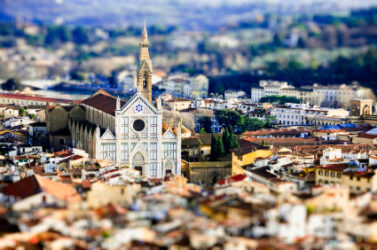
Even though you are trying to make a miniature scene, there’s no reason to actually make it miniature. Look at any “tilt” lens camera shot (I’ve added one below) – it can make even an industrial port where the scale is mind boggling look like a miniature diorama due to DOF – in other words, the camera doesn’t care how big or small the scene is. A 28 mm lens will photograph a large scene or small scene the same, you will just have to move the camera closer to the small scene. (In the real world this isn’t quite true due to lens aberrations but it’s a close enough statement for “perfect” 3D cameras). Just be mindful that as you scale your scene, your depth of field needs to scale too.
So if you have a city block you are filming, your depth of field “window” might lets say start 10 feet in front of the subject and end 20 feet behind. Everything between is in focus (more or less), for a set film-back and aperture. Now make that city block a scale model that fits on a table top and use the exact same camera with the same settings – because you have had to move the camera in close to frame the shot the same way, your depth of field is now reduced so you will need a smaller aperture to keep that same “scaled” focal range. Think of it this way – because you scaled the world you also need to make the hole in the lens smaller too. This is why we can shoot a full sized scene and then put a miniature in the shot seamlessly. As long as you adjust that iris, the camera doesn’t care.
As for multi pass renderings and final-ing out of C4D, the big shops never do the latter. Running an FX house is tough financially – unless your pipeline is super efficient you will go the way of R&H or GVFX or DD (before it was saved) and a host of others. And we all realized that doing test after test in 3D was a terribly inefficient way to get a final look (and terrible for the director sitting in the next chair). So everything goes to compositing in layers. Its so much faster to tweak the shot in real time there than in a slow render engine. You can even change the lighting!
Now things have changed a bit with these new IPR render engines (RedShift, Arnold, Octane etc) so you can get much closer in 3D faster, but still not in real time and not at full rez. So the multipass pipeline is still very valid. However, unlike the physical render engine these third party renderers can do depth of field very fast and on multiple cores or GPU cores – instead of 64 CPU buckets lighting up on a 4k shot, it does my heart good when the whole screen is filled with CUDA core buckets all crunching at the same time. Priceless!
There is nothing wrong with the quality of the physical render engine, but there is a terrible price to pay in the speed (although you can do the pos pass in the standard render engine too and then use all your cores) Although the motion blur in the standard renderer doesn’t hold a candle to the motion blur in the physical.
But even here, we never use a 3D motion blur – it just takes too long. (Back in the day Electric Image had a real-time motion blur in 3D but the guy who wrote the code left the company and they never figured out how he did it so that science has been lost to time). You can render out a vector pass and use that in post to make your motion blur in real time, in the same way we are doing DOF in your example.
-
Steve Bentley
December 7, 2021 at 6:49 pm in reply to: Getting very bad results with Position Pass and Depth of Field in After EffectsIt’s definitely not the easiest of work flows for sure but you get used
to it. The current trend of doing everything in the render engine I
think is unwise. You can do so much to achieve the final look of a shot
in post and at 300x the speed vs doing it in 3D, it only makes sense.
This new school of – where’s the button that says “a small miracle
happens now?” – and expecting one setting to produce perfection is
driving me nuts. (Kids today! And… Get off my lawn! Add your own
industry-professional-long-in-<wbr>the-tooth saying here.)Yes that final scale down is just fine (post extractor).
If you render out at 32 bit full you should never run out of “distance”
in your Pos pass. The numbers capable of a 32 bit file are boggling. But
really you shouldn’t run out of distance in a 16 bit either, that’s a
ginormous number too. It’s just a matter of whether there is enough
separation between coffee bean 1 and coffee bean 2 if you still have to
include the coffee maker that’s in the scene and down the block. It
should still work to the bare eye, it’s just that both coffee beans
might be at the same “depth” blur when technically they shouldn’t be.
But you won’t see that and the scene will look right.I don’t remember if the Pos file is log or linear (linear I would think)
but either way, your monitor is not capable of seeing the slight
differences once you get up into the shoulder and toe of the black to
white “curve”. Your monitor is only 8 bit (or 10 bit at best), so you
might think you are out of room but there should be plenty more there
hidden in the hilights and shadows.I’ll dig out an AE project I’ve done with this workflow and send. What
version are you using? -
Steve Bentley
December 6, 2021 at 9:37 pm in reply to: Particular color gradients – how to get at them?Not sure if I’d call this a bug now but I have new info. This only seems to be an issue in some cases.
If you go into the designer and pick a particular (no pun intended) effect and then apply and start modifying, you can’t access the color grad or modify it, you can only pic from the dozen preset choices.
But if you pick another effect, that one will let you have access to the grad and make changes (or if you just start from scratch) – you still can’t save and add it as a preset or copy that grad to another instance of particular so you have to remake the grad you have worked on each time. You also can’t expand the grad box to do fine detail node work.
I’d be willing accept that some effects have access to this attribute and some not but when it is needed for the effect to work and when you still have access to the color presets in a macro way, it seems dumb that you can’t access or change the colors themselves. I’d say a software call isn’t being made to the right class or with the right number of args, and I think I will call this a bug.
-
Steve Bentley
December 5, 2021 at 9:10 pm in reply to: Ways to create a bezier path for the camera pathI ran into this today to in R25. It’s possible the auto tangents is defaulting to “On” now. So just click on one of the points on your animation path and then in the attributes dialogue twirl down the tangents preset and uncheck “auto tangents”. That should get your handles back. Worst case you can drag the Left value Right value sliders to change the handle length (in the attributes) and work live in the view port
-
Steve Bentley
December 5, 2021 at 4:30 pm in reply to: Getting very bad results with Position Pass and Depth of Field in After EffectsThat fringe or halo IS the antialiasing of the Pos pass. This is why “Your depth pass is wrong” is the title of that video – depth passes are antialiased from the get-go and will produce fringes, Pos passes are binary.
Think of the black point sliders as a Levels control. The only difference is that Levels has an output setting as well, where here, we want our output to be full black and full white so you can think of those sliders as already being set (ok, levels also has the midpoint gamma control as well – I was hoping you wouldn’t notice that)
So depending on how and where you use the levels control you may be adding antialiasing to the Pos pass. If you scale the Pos pass or comps that contain the Pos pass you may be adding antialiasing.
With aliasing, you are defining which pixel is in front and which is behind and then adding a blur. With a depth pass or once you use levels, you already have a blur on the go there (the antialiasing) and then you are blurring it again with the DOF. Think of it this way – when you have an alpha channel on a superimposed comp layer, that alpha has antialaising to blend it with the background below, if you then blur that alpha (without blurring the RGB channels) some of the top layer’s “background” will leak in around the alpha – you will get a fringe that looks like 1970’s chromakey.
If you had your Pos setting in C4D bang on (and it’s hard to do that with values like .0001) then yes you should just be able to add Extractor and you’re done. No black or white point messing around. So it is possible you got lucky there. But I’m usually sliding the B&W all over the place (and then in reverse of what I think they should be) hunting for the range. It’s quicker to do that then do multiple test renders in C4D to see where your correct Pos number is going to fall.
Are you rendering to EXR in at least 16bit? And have you trapped all the channels in Extractor and sent them to blue? (I will think I have done this and then go back in and find that one has “slipped” back to red or green – Extractor has a problem – or maybe it’s AE when using extractor – it doesn’t always release the mouse).
-
Steve Bentley
December 3, 2021 at 5:37 pm in reply to: Getting very bad results with Position Pass and Depth of Field in After EffectsRe the inverted map – yes that is mentioned in that tut and its because most depth plug ins in AE see “distant” as the opposite color that C4D puts out. So that’s normal.
But you bring up a good point re using levels. They mention that in the Tut as I recall and that got me scratching my head because that will antialias the jaggies just as well as scaling would. And that’s bad. You shouldn’t need to – that is what the black and white point are for in the AE depth plugin (or is it in Extractor? – not in front of the machine at the moment). Either way, using the black and white point is what the levels is doing but by using in the b/w point in plugin it won’t add antialiasing. That could be where the fringe is coming from.