Roberts Adi
Forum Replies Created
-

Othman Ahmed
I have finally been able to open the file so I will study it and get back to you
thx
-
Othman Ahmed
Please
I cant open After Effects file because mine is older than yours
I have to go to my friends house to try to use their latest AE like yours but they live far
Can you show me a video example so that I can follow?
please
take your time and any time it’s ready will be fine
I appreciate the help
Roberts
Thanks Again
-
Othman Ahmed one more help please
https://www.youtube.com/watch?v=Z8tRpkCyULc&list=LL&index=1&ab_channel=ElenaRylova
You see the flip board Animation in the video, I want to create something similar but not with
flip boards. I want to use “Random Letters Into Text” like the letter animation from the video below. The same effect.
https://www.youtube.com/watch?v=hGiDtWOLDl4&ab_channel=HenryJohnston
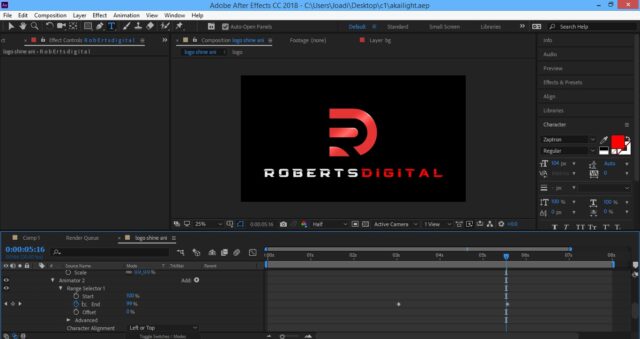
I want to use this effect for the text of my logo as you can see in the image below.
I have tried doing the same animation by following the second Youtube video above but I want to add extra effects
If you watch the flipper video, you will notice there are some brighter flippers that pass after every 4 flipper. Rather than a bright flipper in my random text animation, I’d like gaps to pass to the right with 7 letters in between them instead of 4. I’d like the gap to pass 4 times during the random letters animation. Same speed as flipper video.
After the random letters stops it should form the single word “R O B E R T S D I G I T A L”. I want the “D I G I T A L” to be in red as in the image below. I want the second to the last Gap of the four passing gaps and the last gap to have 7 red letters between them and the random animated letters should drive them to the right between the final 2 gaps and let the red letters end with the word “digital” in red while the remaining gap continue to travel to the right till it disappears. The “Roberts” should remain in white.
The final result should be as the image.
This is actually the second part of the first logo of shapes with the outline. Planning to merge them with a transition.
Please please can you do a recording so that I can follow your video example. Your video examples are often very brilliant and very easy to follow.
Here is the link to the AE file below:
You can delete my own random letter to text animation if you plan to use a different method.
I’d preferably like the animation to start from the left to the right starting with the first gap
Thx. I appreciate every help again
 Some contents or functionalities here are not available due to your cookie preferences!
This happens because the functionality/content marked as “Google Youtube” uses cookies that you choosed to keep disabled. In order to view this content or use this functionality, please enable cookies: click here to open your cookie preferences.
-
Thanks for the help again
I appreciate it
-
What version of AE are you using?
Maybe I can upgrade mine…
-
hi Othman Ahmed
Your AE is not compatible with mine. I am using After Effects portable from 2018 and it wont let your file open
Do you have a video instead, when you are able?
Thx again
-
Hi Ahmed
I want it to be invisible/hidden (for the selected shape only) when the animation slider reaches those 2 dots
Thx
Here’s my file below
-
Oops sorry
Done
-
Roberts Adi
December 29, 2020 at 3:38 pm in reply to: Guys I need to elongate a circle to a rectangle with rounded endsOthman Ahmed
Oh my God
That was wicked
Thank you very much
You saved my life
You really flood it
Thanks again. I really appreciate it
-
Roberts Adi
December 28, 2020 at 11:46 pm in reply to: Guys I need to elongate a circle to a rectangle with rounded endsOthman that’s brilliant thanks
Everyone I asked from the Adobe forum couldn’t solve this…Your video examples are very easy to follow…
However I have another question please
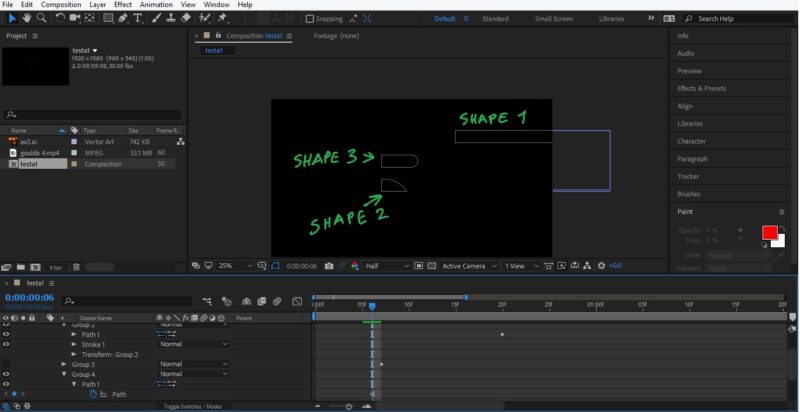
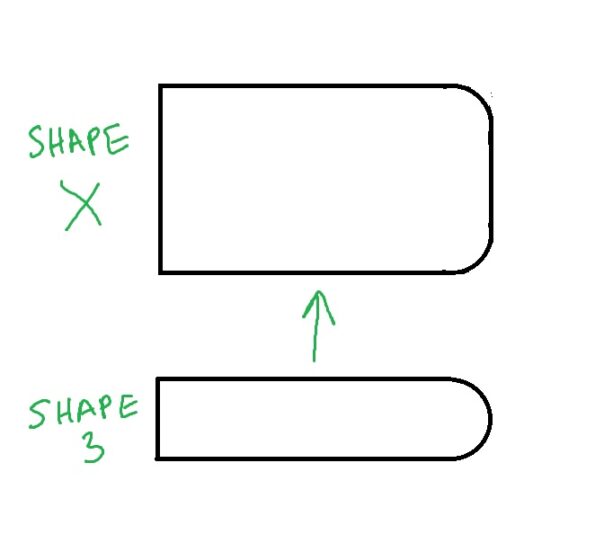
I am working on a project in the image below. Please I want to delete shape 3 (group 4 in the layer panel) and replace it with shape x in second image.
Can it be done within this same AE file I’m working on? I understand that to create shape x I’ll need to merge 2 types of rectangles but I don’t know how. A video example like you did earlier would be much easier to understand.
Below is also a copy of the AE file I’m working on
I’d appreciate the help