Hey Dan! Thanks so much for the reply!
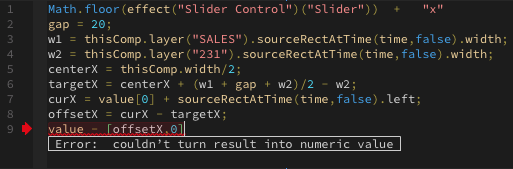
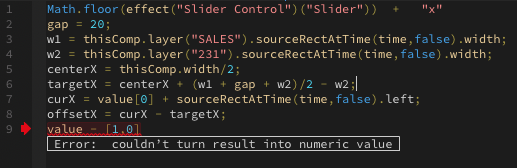
I’ve plugged in the expression but seem to be getting an error for the last line.
Thinking (Offset x) needed to be a value, I added a numerical character there but still got the error.
I do have another expression before that one so I thought that may be causing the error but even in a new comp with only two text layers (Text 1 & Text 2), the error persists.
I’ve broken down the expressions that will precede the auto centering expression. Would these interfere at all?
Text 1 is a counter followed by x (for example: 231x)
Text 2 is the layer that is being translated between different languages. These translations are in a spreadsheet and I can cycle through them with the slider control.
Text 1:
Math.floor(effect("Slider Control")("Slider")) + "x"
Text 2:
const slider = effect("Slider Control")("Slider")
footage("Untitled spreadsheet - Sheet1.csv").dataValue([2, Math.round(slider)]);


 14
AE Expressions Coins
14
AE Expressions Coins
 22
COW Coins
22
COW Coins