Max Jackson
Forum Replies Created
-

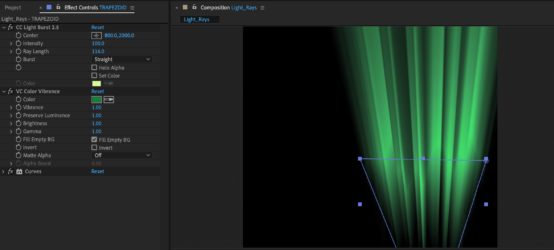
I was able to get this far with recreating Photoshop’s ‘Lighting Effects’. I’m still trying to find a way to blend or layer a bright gradient on top of a shape layer with this CC Light Burst, but it’s getting closer.
The shape I’m using is an upside-down trapezoid. Screengrab attached.
-
I just had a breakthrough this morning. I’m not there yet, but made some major strides.
After revisiting CC Light Burst for like the 5th time, I’ve tried adding it to a shape layer wiggle path and then cycled through the random seed.
It still needs work, but if I get something significant, I’ll post the results.
Thanks again!
-
Hi Greg,
Right, the curtain effect. I saw a tutorial on that a long time ago using fractal noise and thought briefly about that too. So the bezier warp could help me get that keystone-ing? That would be cool. I’ll try playing with that and looking into tutorials in that direction as well.
My challenge I think I might run into with is soft sides to the ‘beams’. I’m hoping I can get a setting that still keeps it hard/flat.
Thanks!
-
Here’s the file, my bad. I must’ve forgotten to attach it. I’ll check out Boris FX.
Thanks!
-
Max Jackson
August 15, 2014 at 9:23 pm in reply to: After Effects CS5 error: Error (4) reading frame from file…what the heck?I managed to work something out. You know, I don’t know what was going wrong. Eventually CS5 (OS X) wouldn’t open any MOV files giving me the same error. So I was like screw it, I’m going to re-install AE CS5 and Premiere CS5 and restart my computer. Lo and behold upon uninstall the Uninstaller alerted me “please turn off dynamiclinkmanager to uninstall”. Well, it must’ve been something in the background becuase nothing was visibly active.
So I cancelled the uninstall, restarted the computer. Then finished the install for AE and Premiere and voila…works like a charm.
I briefly used Premiere to isolate a video clip edit as I was using Twixtor and it was frame blending stuff I didn’t want for one small sequence. It stalled a bunch when I tried importing Premiere projects into AE that weren’t actively open. That migjht’ve had something todo with it.
I have later versions of AE but need CS5 because it’s got the DeForm plugin.
Again, not sure why CS5 was buggin’ but glad inbooting the whole thing fixed the glitch.
Thanks for the response! 🙂
-
Paul, just want to say a quick THANK YOU for posting this quick thread reply.
Been doing a simple tutorial on this to the letter that was done using an older version and the Object mattes were not coming up. Was really not looking towards posting another noob post on a forum but couldn’t for the life of me figure what I was doing wrong.
Again, it was that dang ‘Switch X!’
-
You know, I totally agree. I’ve been studying C4D some but don’t have the money to buy any 3rd party software at the moment. I guess it’s a good form of creative troubleshooting and survival.
It took all day but I found a solution. I currently have 3D Stroke and was able to use three shape layers doubling the stroke for each one on top and inverted matte one on top of the other. It behaved glitchy until render for some reason but now seems to work just fine.
I sure do look forward to having a true 3D tool at some point in time though.
Thanks Dave!
-
Adam, that’s great news because I’m a motion guy and additionally to re-create a font in 3D says to me I should’ve been a sculptor. That would be rather discouraging if that was the norm. I’m not a sculptor. I really like C4D for it’s ability to move and bring/take things together/apart.
I don’t mind roto and taking time to get something exact, but…stuff like fonts take a load of time in 2D, I don’t imagine I could really compete by hand in 3D. At least, the whole time I’d mentally be working up an apology one extrude length at a time before hand.
Thanks again! 😀
-
Okay, cool. So it sounds like eyeballing it using snap settings is a common way to coordinate objects in space, right?
I know that sounds like a dunce question. It’s just that there’s so many tools used to build a relief of sorts. I wanted to make sure there wasn’t a more professional or more suitable way that people use to combine objects that I might be missing.
Thanks Darby! 🙂
-
That was easy huh? 🙂
Thanks Vishesh!