


Joey English
Forum Replies Created
-

Joey English
November 7, 2008 at 3:26 am in reply to: Best workflow for editing with the Adobe suiteThank you both for the suggestions. I guess, having done extensive audio work and graphic design for so long I was used to the workflow I was using before, easily switching back and forth between applications with ease; now I feel a little clumsy, trying to wrap my head around just which program I should be using for what — being that each do similar tasks in certain situations.
What I ended up doing was editing my title in AE with the specific audio effects I needed to match to key frames, moved over to PP to add in the soundtrack that blanketed the entire comp and then added the edited video for the actual review at the end of the title, and used PP to overdub the voice track and make any small refinements to the audio for the entire project. So far this is working for me, though I’m still open to suggestion on how to further streamline the process.
And thanks for the recommendation Mike. I will definitely check out the site and see what it has to offer.
I don’t believe in shameless self-promotion, so I will ask prior to posting, would it be against the rules to post the finished product here in order to receive some critiques on the work and content?
-
Joey English
November 6, 2008 at 2:07 am in reply to: Trying to achieve a simple 3D line, drawn in from off camera.You were so helpful Rork, I was hoping you could check out an almost finished version of the animation I’ve been working on to give me any tips or pointers on ways to improve what I already have. I know the audio needs some work (that mainly comes from my not understanding exactly how to preview my comp with audio at the moment; so it’s difficult to sync things up).
I’d like to speed up the beginning segment and make the text appear as if it bounces up for a split second at the end of its animation. Not sure how to do this, honestly.
I realize this goes beyond the scope of this thread, and if this should be posted in a different area please let me know.
Appreciate your time, thanks.
https://www.youtube.com/watch?v=1RZmnDW-FPY
-
Joey English
November 4, 2008 at 6:11 pm in reply to: Trying to achieve a simple 3D line, drawn in from off camera.Thanks again Rork. I’ve actually done the 3DShapeExtruder tutorial with text before. Not sure whey I didn’t consider using it for this particular situation. I’ll give those a shot and see how it turns out.
Again, I appreciate the help 🙂
-
Joey English
November 4, 2008 at 5:21 pm in reply to: Trying to achieve a simple 3D line, drawn in from off camera.Yes, and as I intend to pan the camera around in the 3D space I’d like to keep it that way, as I will have graphic elements in front of and behind the line to create a feeling of depth.
-
Joey English
November 4, 2008 at 4:41 pm in reply to: Trying to achieve a simple 3D line, drawn in from off camera.First off, thanks for the quick response Rork. This helped me achieve another effect I was looking to accomplish (and I appreciate the detailed step-by-step, gave me a lot of insight on how to do a few things I was iffy on, such as moving the anchor point for correct rotation), however, I’m trying to achieve something slightly different.
Here’s a pic to help explain what I’m trying to accomplish (I’ll ask that excuse the crappy quality, I’m on my laptop out of the house and don’t have any image editing applications or my Wacom handy):
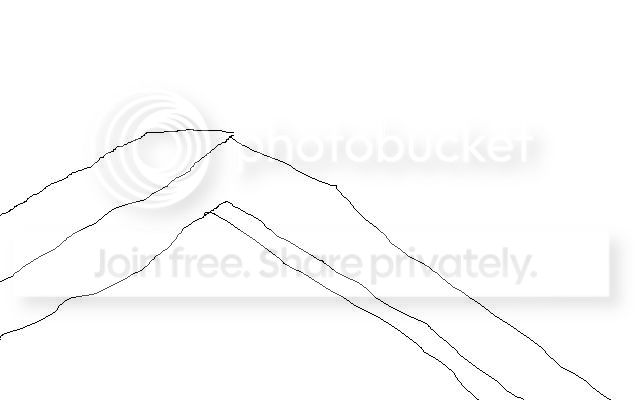
So you see, I’m trying to create something that draws in from the left side of the screen and downward, a 3-dimensional box, rather than just a line. The mask reveals a line perfectly, but what I want is for the object to “extrude” from off camera, draw down seamlessly at an angle and subsequently animate off screen. A simple mask animation won’t work for this (I’m assuming) because I want the object to appear in 3D as it’s drawn; like a box leaving a trail, perhaps? I imagine what I would have to do is create a Square brush, and have that brush animate along a path, drawing itself repeatedly as it is doing so — but I’m not sure if this is possible, or if this is even the correct method for achieving said effect.
Again, thanks for the help. Hopefully you’ll have a better idea of what I’m trying to accomplish and can lend a hand again.
Joey.