Forum Replies Created

Page 13 of 277
  • Filip Vandueren

    April 5, 2023 at 3:44 pm in reply to: position of highest alpha pixel

    the lastline could be something like:

    [960, l.toComp([w/2, topEdge])[1] -50 ];
  • if “let” and “const” were giving you errors, your after effects project is set up with “legacy extendscript” as the Javascript engine (or you’re working in an old version of After Effects).

    You can change it in the project settings.

  • Filip Vandueren

    April 5, 2023 at 8:53 am in reply to: position of highest alpha pixel

    Here it is with a faster binary (powers of 2) approach, only searching the top edge, up to pixel accuracy:

    posterizeTime(0);
    const l = thisComp.layer("Logo");
    const w = l.width;
    const h = l.height;
    const heightLog2 = Math.ceil(Math.log(h)/Math.log(2));
    const threshold = 1; // on average 1 pixel in a row is opaque to count as the topEdge;
    var topEdge = 0;
    for(i=heightLog2; i>-1; i--) {
    let partition = 2 ** i;
    let s = l.sampleImage([w / 2, topEdge+partition/2], [w / 2, partition/2], false, time);
    if (s[3]<=threshold/(w*partition)) topEdge+=partition;
    }
    l.toComp([w/2, topEdge - 50]);
  • Filip Vandueren

    April 5, 2023 at 7:11 am in reply to: position of highest alpha pixel

    Hi Adam,

    there was a thread about this a few years ago:

    https://creativecow.net/forums/reply/2435715/#.ZC0d9tachSs.link

    it samples lines/columns from all four sides until it hits one that contains alpha information.

    It can be made faster with a binary search, but for precision while sampling and averaging out, you would again want the project to be at least 16bpc

    Reply To: Is there a way to know the width and height of a layer similar to sourceRectAtTime?

  • Hey Alex,

    try this:

    You have a text-layer with keyframes winter/spring/fall/…

    you have a layer with markers that share those names.

    Any properties that need to respond should have keyframes at the times of those markers, and each should have this expression:

    const txt = thisComp.layer("text").text.sourceText;
    var val = "";
    var t = 0; // the fallback timing in case of error / non existing key
    // get the current text value
    if (txt.numKeys>1) {
    let txtKey = txt.nearestKey(time);
    if (txtKey.time>time && txtKey.index>1) {
    val = txt.key(txtKey.index-1).value;
    } else {
    val = txtKey.value;
    }
    } else {
    val = txt.value;
    }
    // check for a marker on this layer that has teh same name as mentioned in textLayer
    try {
    t = thisLayer.marker.key(val).time;
    } catch (e) {}
    // return the "preset" value ar time t
    valueAtTime(t);

    This works for Colorama’s output cycle, but unfortunately I noticed After Effects doesn’t allow us to put an expression on the “Colors / Edit Gradient” Property of a Shape Layer Gradient Fill or Stroke…

  • Hi Alex,

    Before getting into a solution: a thing to note is that gradient properties are a special type of property that can not be set or manipulated directly (numerically) using expressions. (Curves-keyframes are another example)

    A few workarounds for that: if there are keyframes of different gradient settings, then you can use .valueAtTime() and/or .value to “copy” the entire setting from somewhere where the preset is stored in a keyframe, but it sounds like you also want to interpolate between them.

    Another workaround is that you use a grayscale gradient, and a CC toner effect with up to five colors: those colors can have expressions with precise control over the colors, and can cross fade, but their 5 “positions” on the gradient are fixed.

    Another workaround is to have multiple layers ( or multiple effects applied) with each look at the same time and only fading in the one you need. The downside can be that crossfading between contrasting colors this way can look murky.

  • Hey Adam,

    It’s pixel-based so there should be no other reason why capitals won’t work.

    One thing to note: the expression works by checking linespacing settings that are smaller than what is applied before the animators get active.

    So you have to make sure that in your template the leading is more than enough to not have stuff like Ç and Á touch before the expression gets run.

    My example project had a quite low leading setting.

  • Hey Adam, go it working on 1 text-layer. But I’m not doing anything else with the layer (animating, text-animators,…) which could break it.

    https://we.tl/t-gpWLxdbh0g

    I recommend unchecking the checkbox before editing text, then re-enabling.

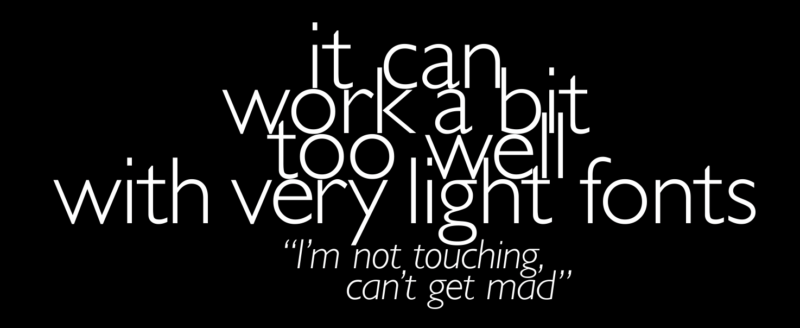
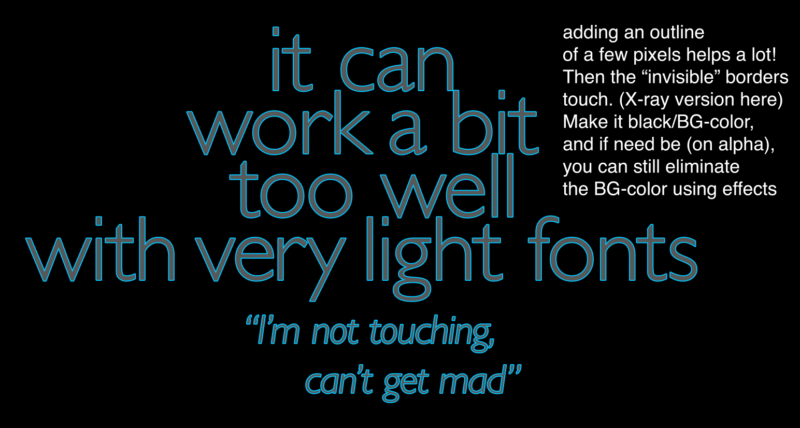
    And a funny caveat in the image…

    A good way to add some extra safety margin is to add a stroke of the background color around the text (black in my example image) . The “extra pixels” control that I added only looks vertical, while a stroke would also ensure a minimal horizontal distance of a few pixels to avoid.

    Of course, in a capitalized french text with accents, you’ll never get as extreme of an example as here.

    Also, very important, forgot to mention: this needs 16bpc precision, so in an 8bpc project, it’ll collapse.

  • I can’t get it to work on one layer.

    Best I can do is: it tells you the linespacing value you have to enter manually for minimal overlap. Could be easily scripted too, but just a preset with expressions on 1 layer is unreliable.

    https://imgur.com/a/MeVAek5

    It’s really neat how with a bit of kerning you can minimize the height by nudging the accents and descenders into nooks and crannies 🙂

    View post on imgur.com

  • Also, if there are text animators on the text too that can move the letters around, then it’s much better to do the analyzing of the text on a second hidden layer.

Page 13 of 277

We use anonymous cookies to give you the best experience we can.
Our Privacy policy | GDPR Policy