Forum Replies Created

Page 2 of 2
  • Dave Giardina

    June 23, 2022 at 2:04 pm in reply to: Capturing mini-dv tapes to PC

    Thanks for the info. So a major takeaway here is that I can’t use Vegas Pro for this. The capturing device I have does make a sound when I plug it in. And it did come with a small installation disc which I can’t use on my PC. But the instructions said I could download/install OBS which I did. It then says to open “applications – QuickTime Player”. Then “File – New Movie Recording”. Then select “AV TO USB2.0”. However I’m not seeing these options on QuickTime Player when I open that.

  • Dave Giardina

    June 22, 2022 at 3:20 pm in reply to: Capturing mini-dv tapes to PC

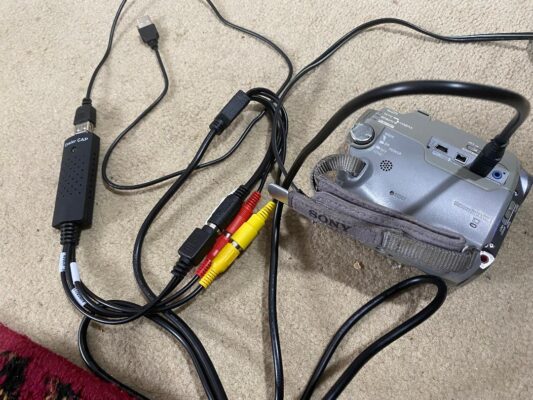
    It’s says it’s a New series USB2.0 Video Grabber. Here is a photo of it on the left as attached to the handycam using an a/v cable.

  • Dave Giardina

    June 21, 2022 at 9:05 pm in reply to: Capturing mini-dv tapes to PC

    My pc doesn’t have firewire. When I talked to Sony they said to use a/v to usb for it. I have all of those components but I’m not sure what the next step is to get the pc to recognize the camcorder so I can capture the mini-dv footage.

  • Dave Giardina

    March 4, 2018 at 10:37 pm in reply to: Can’t Capture Video from Camera in SV 13

    Yes, everything is the same. I’m not sure why I don’t even get a window that pops up once I click “DV”.

  • Dave Giardina

    March 4, 2018 at 10:04 pm in reply to: Can’t Capture Video from Camera in SV 13

    Yes, as above I connect the camera to the computer with a firewire. When I click “capture video” and “dv” I get nothing allowing me to go further. This was never an issue before.

Page 2 of 2

We use anonymous cookies to give you the best experience we can.
Our Privacy policy | GDPR Policy