Dan Appel
Forum Replies Created
-

Dan Appel
March 18, 2022 at 10:06 pm in reply to: Network Media Management kicked back -50mv video???Thanks David
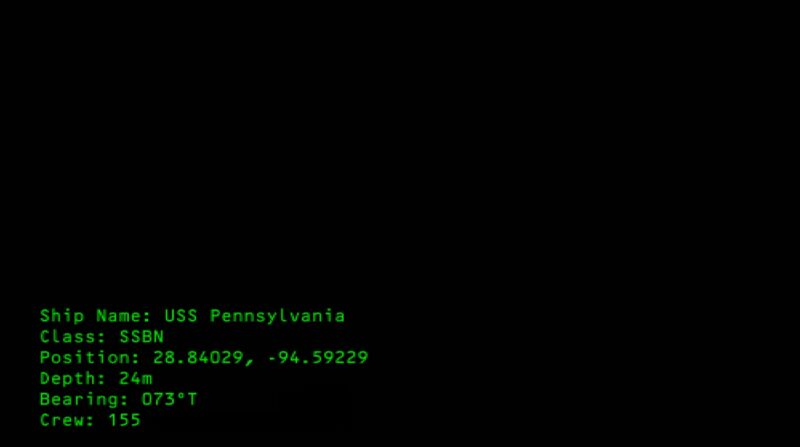
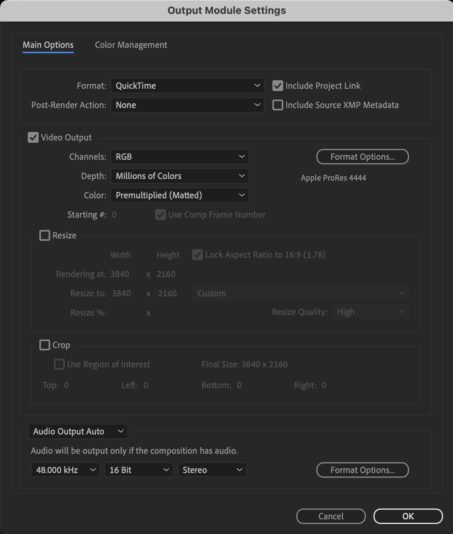
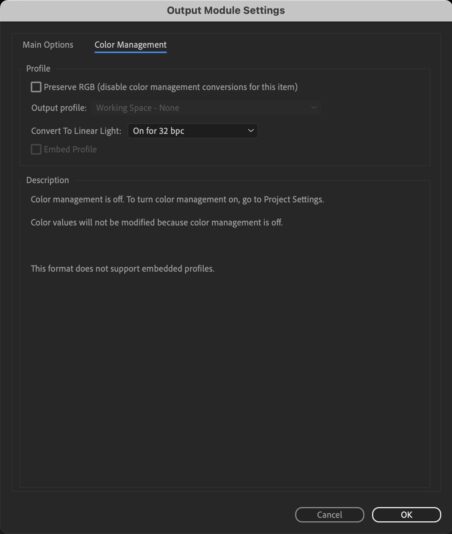
The section is question was an animation output from AE – green type on a “Black Solid” layer that was RGB 0/0/0. I’ve attached screen shots of the animation in question as well as output specs – again nothing out of the ordinary that I’m seeing. Should I just make the black solid RGB 1`/1/1…? So odd.

-
Here’s my beef, though, with Kona 3. In the HD-SD downconvert, I see a rather noticeable halo around edges (esp in contrasty areas and GFX). When we do the same conversion through a Teranex mini, you don’t get the halo, but it feels ever-so-slightly… over-processed? A little in-organic.
And whilst on the subject, it seems as though there are options, when sending dubs/conversions out of house, that some facilities just go deck-to-deck (HDCAM SD-SDI out to Digibeta) and other route through a (full-sized) Teranex or UKON. Is there a difference? Is the in-deck downconvert any better than the convertor boxes? Is there a a best case scenario for one process over another (ie: frame rate changes; aspect ratios)? Primarily, I’m a fanatic for quality (much to my staff’s dismay), so any insight is appreciated.
And sorry for being a little off-topic. ThxD
-
All I’m saying is that I wish the Kona 3 did a better job at HD/SD conversion. Yes, it does A LOT — and I do appreciate it, even if my previous post belies that fact — but conversions are integral to what we do — and seemingly integral to what Aja is selling in this product.
Perhaps Aja might want to reconsider (or redefine) billing the Kona 3 as “broadcast quality” when the visual results of the conversion — what we see on the screen (which is the most important aspect) — is so poor.
-
For what it’s worth, we demo’d the Teranex Mini and it WAY outperforms the downconvert (HD-SD) from the Kona 3. It has no bells or whistles — it just does size conversions — but the results were far sharper than that of the Kona. Sorta bummed that I seemingly wasted the extra money on the Kona 3 (as opposed to the LH that I had originally intended to purchase), but what are you gonna do? Live and learn: Ca-ching.
-
Anyone have any experience with the TERANEX MINI?
It’s much less elaborate — it only does HD/SD size (not rate) conversions — but apparently uses the same algorithms (?) as its $25-35K siblings, but costs only $2,500. Sounds sorta good to be true, but according to Teranex, they get the same call that Matt complains about on a weekly basis.
And when I called AJA about the same problem (softness on the HD to SD downconvert) the other day, the technician’s ultimate response was, “Well, I guess it sorta is what it is…”
-
So in the end, after research and side-by-side tests, we went with the JVC.
Some things we learned along the way:
JVC DT-V24L1DU: Of the three, this is the only one with a glossy screen, which probably accounts for its seemingly richer blacks. It has HD-SDI standard, full 1920×1080 image and a 1:1 button that allows you to see whatever image you’re throwing at it in its native pixel-to-pixel size. Unfortunately for 16:9 letterboxed SD images (as we’re presently delivering a show), it makes the image so small as to be almost useless. Also of extreme annoyance is the angle of view. Though listed at 176 degrees in all directions, that only holds true if you are legally blind. There is a sweet spot, and it’s about 5-10 degrees (max), which simply means that while color correcting, you will need to be head-on while working. Not such a big deal, but annoying.
PANASONIC BT-LH2600W: Though the JVC had richer blacks, I get the sneaking suspicion that the Pani has slightly truer colors. But the smaller resolution (1366×768) combined with the bulky size of the monitor were a drawback. Also, their cockamammy (sp?) pixel-to-pixel option is just weird. It offers you the ability — like the JVC — to see your image in it’s native pixel size. So because of the lower resolution, for full HD, it’s blowing up the image — you can only see the image cropped from one of the four corners (or centered). The most annoying quirk of this option is that you can not use pixel-to-pixel with an SD signal — even with SD-SDI, it’s nonfunctional. Only HD-SDI. Now this is just plain dumb. If the monitor had given me pixel-to-pixel in SD, I probably would’ve bought it, because it would have given me a larger SD viewing image than the JVC. Again… dumb. (Note: Some have mocked my SD concerns, but let me say that most of clients still require SD deliverables, and if they do need HD, they also want me to give them SD as well, and I think it’s gonna be like that for at least another couple years — if only because many of my clients simply don;t want to pay to have every show deliver in HD. One unnamed cable client prefers to uprez everything for their sister HD channel. Go figure.)
SONY LMD-2450WHD 20″ (w/HD-SDI kit): Okay, Bob is right. It’s crap. Switching between this and the JVC, it was shocking how contrasty the image was. I assumed that someone must’ve cranked up the contrast in the showroom, but when I centered out all of the controls (set Contrast, Brightness, etc to 50), the image was extremely dark AND there was still no information in the whites (that the JVC held).
So is the JVC perfect? No. But weighing all of the issues, I felt it was the best of the bunch for my needs. There is no doubt in my mind that these LCD’s do not come close to CRTs. Not by a longshot. But then again, I have no interest (or funds) to get into the CRT-killers like the eCinemas for 10x the price or the Sony BVM.
For my SD work, I just bought a 13″ Sony PVM off Craigslist for $75, so at least if I need to check critical focus, I can.
There you go. My six cents.
Thanks all for your help.
-
Thanks for the info, but I wanted to follow up.
Having read some posts in a similar thread (the one where you and another guy nearly go to fisticuffs), I see a similar issue whereby most of what I do right now is still SD. When I monitor off of the JVC LCD, I feel I do not get nearly an accurate sense of the resolution — I suspect because it’s blowing the image up. For HD, it’s awesome (I tried). But looking at SD in the 1:1 mode is just too small to be practical.
How do you feel about the (seemingly now or soon-to-be discontinued) JVC multiformat tube monitors (DT-V1710CGU, DT-V1910CGU, DT-V1710CG, DT-V1710CG)…? With the HD-SDI cards, it works out to around $4k (maybe a bit more). It would seem that maybe that would be better for being able to work with SD in the near-term and HD down the road…?
Do you have an opinion?
Also, can an HD-SDI board accept an SD SDI signal, or does one need separate inputs (either HD/SD-SDI combo or separate HD-SDI & SD-SDI boards)?
Many thanks.
Dan -
I’m fine to pay around $4,000 because that is ultimately what it’s costing me to rent the JVC DT-V24L1DU over the course of a year’s worth of episodes we’re onlining.
I just want something that gives me pretty decent color-grading & pixel-accuracy and has HD-SDI input — without having to spend north of $15k.
BTW: Something that i seemed to notice with the JVC was that the angle of view — even though it’s billed as 176 degrees — was quite different from even 20 or so degrees above than it is head-on. Maybe I’m just renting a bad one…?
-
And I rent the monitors and decks on an as-needed basis.
-
Thanks for your help, Bob. I appreciate it.
(But I could do without the insult. Money’s tight these days.)