Forum Replies Created

  • Chris Rush

    December 11, 2020 at 9:34 pm in reply to: Avid MediaFiles creates named folder instead of numbered

    Super late reply but thank you Glenn. We had to get to work so what I ended up doing was create 1536×864 (pure 16:9 aspect ratio) DNxHR LB files. Those work great with the ale and the only hiccup is that the editors have to use the new title tool instead of the old one that they normally prefer.

    I’ll have to give that a shot with the mxf extension. Thanks for checking it out for me!

  • Chris Rush

    November 9, 2020 at 4:36 am in reply to: Avid MediaFiles creates named folder instead of numbered

    UPDATE:

    If I export it as MXF OP-Atom 720p it DOES NOT work.

    – I’ve tried every single flavor of DNxHD and DNxHR at this resolution. When I export these I make sure my timeline is set to 1280×720.

    But if I do MXF OP-Atom 1080p 36 it WORKS.

    I’m working with a VPN setup for about 6 people so I’d really like to stay in 720p haha. Gonna keep trying because something has to give, but any help would be appreciated as 720 would be best case scenario.

  • Chris Rush

    November 8, 2020 at 6:29 pm in reply to: Avid MediaFiles creates named folder instead of numbered

    Thanks Glenn. Great youtube videos by the way. Came across them recently.

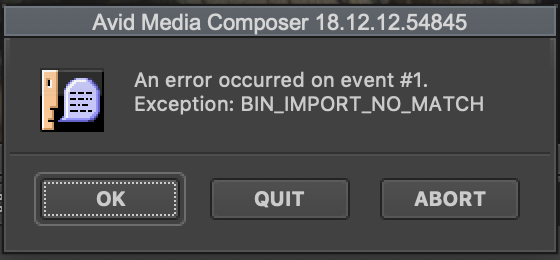
    Now that this part is sorted, the only problem I’m having now is getting the Scene/Take and soundroll metadata to come across. In the past I’ve done this using an ALE and linked it to the clips but I’m having no luck as I’m now receiving an error screenshotted below.

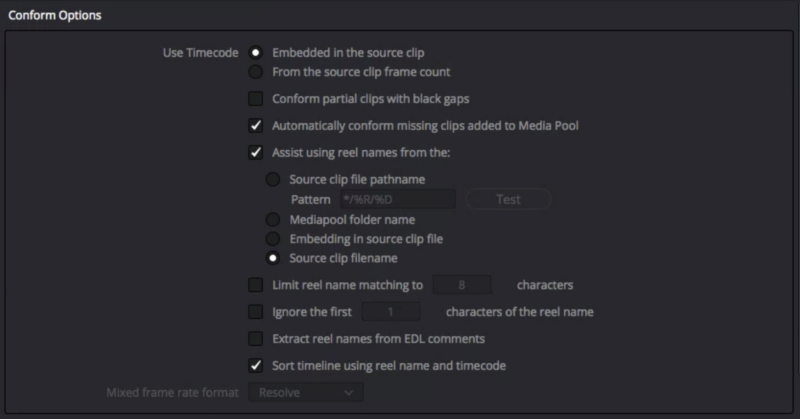
    I have assist using source clip filenames on in Resolve. I make sure that’s on BEFORE bringing in any media. I have the correct frame rate setup in both Resolve and Avid. Screenshot there as well.

    Order of operations:

    Set project settings and timeline settings in Resolve (timeline setting set to 720 due to VPN remote workflow)

    Bring in audio/video

    Sync audio with timecode

    Make timeline with selected clips in Resolve

    Export ALE from that timeline

    Export 720p DNx files

    Copy MXF files to Avid MediaFiles then open Avid to generate mdb file

    Bring in MDB file to new bin

    Select the clips and import ale (set to merge with master clips)

  • Chris Rush

    November 6, 2020 at 5:49 pm in reply to: Avid MediaFiles creates named folder instead of numbered

    I made a new folder by copy pasting the JohnDoe imac.1 folder name, and made a “JohnDoe imac.2” and put some media in it. As soon as I opened MC the folder populated with an MDB and PMR.

    Is this normal practice for shared storage? If so, I guess in this case I’ve solved the issue.

    Is it okay for me to rename these to simple numbers like the shoot date later on?

  • Chris Rush

    November 6, 2020 at 4:48 pm in reply to: Avid MediaFiles creates named folder instead of numbered

    Shared storage: Yes.

    New user settings: I have not. What’s the best practice for this?

    Enable bin sharing on 3rd party storage: I think we do want that ticked actually because of the fact that we are using a QNAP for our storage and Mimiq which is a emulator for bin sharing.

We use anonymous cookies to give you the best experience we can.
Our Privacy policy | GDPR Policy